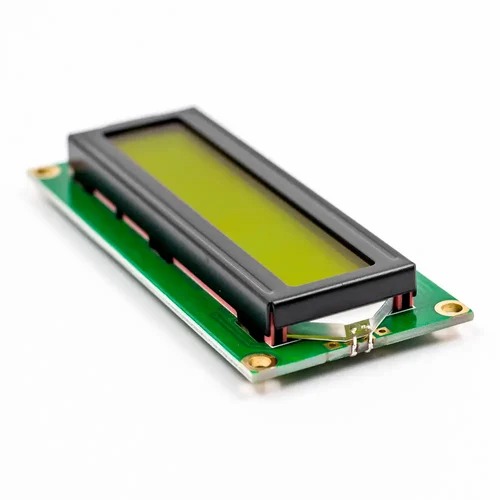
LCD1602 Yellow Green Backlight 5V

  1. Model: LCD1602
  2. Character Color: Black
  3. Backlight: Yellow
  4. Supply voltage: 5V
  5. Dimensions (L x W x H) mm. : 80 x 36 x 10
SKU: AA012 Categories: , Tags: ,

Apple Shopping Event

Hurry and get discounts on all Apple devices up to 20%

Original price was: 90,00 EGP.Current price is: 80,00 EGP.

12 People watching this product now!

Payment Methods:

Original price was: 90,00 EGP.Current price is: 80,00 EGP.
5,50 EGP
8,00 EGP
60,00 EGP
Original price was: 163,50 EGP.Current price is: 153,50 EGP.
For 4 items

Description

If you want to add some visual output to your Arduino projects, you’ll need a display. If you need only little to display, the LCD1602 Parallel LCD Display is a quite good solution.

This is LCD1602 Parallel LCD Display that provides a simple and cost-effective solution for adding a 16×2 Black on RGB Liquid Crystal Display into your project. The display is 16 character by 2 line display that has a very clear and high contrast black text upon a Gray background/backlight.

This is a great Gray backlight LCD display. It is fantastic for Arduino-based projects. This LCD1602 Parallel LCD Display with Gray Backlight is very easy to interface with Arduino or Other Microcontrollers.

The values shown on the display can be either simple text or numerical values read by the sensors, such as temperature or pressure, or even the number of cycles that the Arduino is performing.

One thing to consider is you’ll waste about 8 Pins on your Arduino for the display to get working. Luckily there exists an I2C adapter that you can solder right onto the pins of the display. So all you need to connect are the I2C pins, which show a good library and little of coding. We have the same LCD module with a pre-assembled I2C adapter, click on the name below to check it

Features :

  1. 16 characters wide, 2 rows
  2. Black text on the Gray background
  3. Single LED backlight included can be dimmed easily with a resistor or PWM.
  4. Can be fully controlled with only 6 digital lines! (Any analog/digital pins can be used)

Package Includes :

1 x LCD1602 Parallel LCD Display with Gray Backlight

🔌
Pin Connections
1 Table
Pin Connections Table 1
BoardSensor PinConnection
LCD1602RS/EN/D4-D7/VOboard digital pins / board digital pins / 10k contrast pot wiper
📟
LCD1602 Yellow Green Backlight 5V
7 Examples • C/C++ | Boards: Arduino Uno, Arduino Nano, Arduino Mega, ESP32, ESP8266, STM32, Raspberry Pi Pico
LCD1602 Yellow Green Backlight 5V - Arduino Uno
LCD1602 Yellow Green Backlight 5V - Arduino Nano
LCD1602 Yellow Green Backlight 5V - Arduino Mega
LCD1602 Yellow Green Backlight 5V - ESP32
LCD1602 Yellow Green Backlight 5V - ESP8266
LCD1602 Yellow Green Backlight 5V - STM32
LCD1602 Yellow Green Backlight 5V - Raspberry Pi Pico
📄 File: lcd1602_yellow_green_backlight_5v_-_arduino_uno.inoArduino Uno
435 characters
1//ekostra.com
2//electronics store in egypt
3//+201008896258
4
5// RS=12, EN=11, D4-D7=5,4,3,2 on Arduino Uno. Also wire R/W to GND, and a 10k pot between VCC/GND with its wiper to VO for contrast.
6#include <LiquidCrystal.h>
7
8LiquidCrystal lcd(12, 11, 5, 4, 3, 2);
9
10void setup() {
11 lcd.begin(16, 2);
12 lcd.print("Hello, Ekostra!");
13}
14
15void loop() {
16 lcd.setCursor(0, 1);
17 lcd.print(millis() / 1000);
18 lcd.print(" sec");
19 delay(500);
20}
📄 File: lcd1602_yellow_green_backlight_5v_-_arduino_nano.inoArduino Nano
436 characters
1//ekostra.com
2//electronics store in egypt
3//+201008896258
4
5// RS=12, EN=11, D4-D7=5,4,3,2 on Arduino Nano. Also wire R/W to GND, and a 10k pot between VCC/GND with its wiper to VO for contrast.
6#include <LiquidCrystal.h>
7
8LiquidCrystal lcd(12, 11, 5, 4, 3, 2);
9
10void setup() {
11 lcd.begin(16, 2);
12 lcd.print("Hello, Ekostra!");
13}
14
15void loop() {
16 lcd.setCursor(0, 1);
17 lcd.print(millis() / 1000);
18 lcd.print(" sec");
19 delay(500);
20}
📄 File: lcd1602_yellow_green_backlight_5v_-_arduino_mega.inoArduino Mega
436 characters
1//ekostra.com
2//electronics store in egypt
3//+201008896258
4
5// RS=12, EN=11, D4-D7=5,4,3,2 on Arduino Mega. Also wire R/W to GND, and a 10k pot between VCC/GND with its wiper to VO for contrast.
6#include <LiquidCrystal.h>
7
8LiquidCrystal lcd(12, 11, 5, 4, 3, 2);
9
10void setup() {
11 lcd.begin(16, 2);
12 lcd.print("Hello, Ekostra!");
13}
14
15void loop() {
16 lcd.setCursor(0, 1);
17 lcd.print(millis() / 1000);
18 lcd.print(" sec");
19 delay(500);
20}
📄 File: lcd1602_yellow_green_backlight_5v_-_esp32.inoESP32
437 characters
1//ekostra.com
2//electronics store in egypt
3//+201008896258
4
5// RS=13, EN=12, D4-D7=14,27,26,25 on ESP32. Also wire R/W to GND, and a 10k pot between VCC/GND with its wiper to VO for contrast.
6#include <LiquidCrystal.h>
7
8LiquidCrystal lcd(13, 12, 14, 27, 26, 25);
9
10void setup() {
11 lcd.begin(16, 2);
12 lcd.print("Hello, Ekostra!");
13}
14
15void loop() {
16 lcd.setCursor(0, 1);
17 lcd.print(millis() / 1000);
18 lcd.print(" sec");
19 delay(500);
20}
📄 File: lcd1602_yellow_green_backlight_5v_-_esp8266.inoESP8266
439 characters
1//ekostra.com
2//electronics store in egypt
3//+201008896258
4
5// RS=D0, EN=D1, D4-D7=D2,D3,D4,D5 on ESP8266. Also wire R/W to GND, and a 10k pot between VCC/GND with its wiper to VO for contrast.
6#include <LiquidCrystal.h>
7
8LiquidCrystal lcd(D0, D1, D2, D3, D4, D5);
9
10void setup() {
11 lcd.begin(16, 2);
12 lcd.print("Hello, Ekostra!");
13}
14
15void loop() {
16 lcd.setCursor(0, 1);
17 lcd.print(millis() / 1000);
18 lcd.print(" sec");
19 delay(500);
20}
📄 File: lcd1602_yellow_green_backlight_5v_-_stm32.inoSTM32
449 characters
1//ekostra.com
2//electronics store in egypt
3//+201008896258
4
5// RS=PB0, EN=PB1, D4-D7=PB2,PB3,PB4,PB5 on STM32. Also wire R/W to GND, and a 10k pot between VCC/GND with its wiper to VO for contrast.
6#include <LiquidCrystal.h>
7
8LiquidCrystal lcd(PB0, PB1, PB2, PB3, PB4, PB5);
9
10void setup() {
11 lcd.begin(16, 2);
12 lcd.print("Hello, Ekostra!");
13}
14
15void loop() {
16 lcd.setCursor(0, 1);
17 lcd.print(millis() / 1000);
18 lcd.print(" sec");
19 delay(500);
20}
📄 File: lcd1602_yellow_green_backlight_5v_-_raspberry_pi_pico.inoRaspberry Pi Pico
449 characters
1//ekostra.com
2//electronics store in egypt
3//+201008896258
4
5// RS=10, EN=11, D4-D7=12,13,14,15 on Raspberry Pi Pico. Also wire R/W to GND, and a 10k pot between VCC/GND with its wiper to VO for contrast.
6#include <LiquidCrystal.h>
7
8LiquidCrystal lcd(10, 11, 12, 13, 14, 15);
9
10void setup() {
11 lcd.begin(16, 2);
12 lcd.print("Hello, Ekostra!");
13}
14
15void loop() {
16 lcd.setCursor(0, 1);
17 lcd.print(millis() / 1000);
18 lcd.print(" sec");
19 delay(500);
20}
Parallel-interface 16x2 character LCD (HD44780-compatible).

Specification

Specification

WeightWeight30,0000 g
Dimensions36 × 80 × 10 cm
ModelLCD1602
Characters16
Character ColorBlack
BacklightYellow
Input Voltage (V)5

Customer Reviews