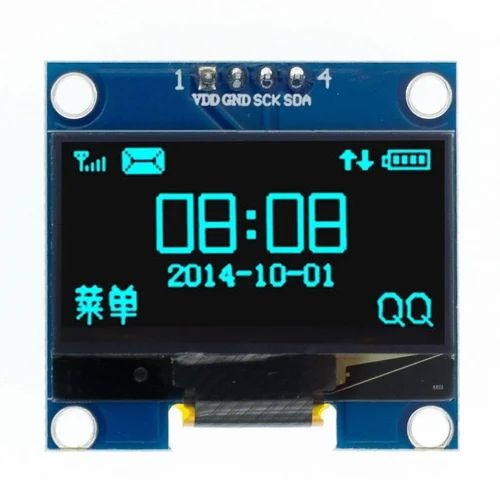
1.3 Inch I2C IIC 4 pin OLED Display Module

  • 1.3″ OLED screen with 128×64 resolution

  • I2C interface – requires only 2 data pins (SDA, SCL)

  • White or blue pixels on black background (batch-dependent)

  • Ultra-low power consumption for energy-efficient projects

  • Wide viewing angles and high contrast display

  • Based on SSD1306 controller – compatible with U8g2 and Adafruit libraries

  • 3.3V to 5V operating voltage – works with most microcontrollers

  • Compact design with mounting holes for easy installation

Apple Shopping Event

Hurry and get discounts on all Apple devices up to 20%

300,00 EGP

8 People watching this product now!

Payment Methods:

Description

This is a 1.3 inch blue OLED display module. The display module can be interfaced with any microcontroller using SPI/IIC protocols. It is having a resolution of 128×64. The package includes a display board, display, 6 pin male header pre-soldered to board.

OLED (Organic Light-Emitting Diode) is a self-light-emitting technology composed of a thin, multi-layered organic film placed between an anode and cathode. In contrast to LCD technology, OLED does not require a backlight. OLED possesses high application potential for virtually all types of displays and is regarded as the ultimate technology for the next generation of flat-panel displays.

OLEDs basic structure consists of organic materials positioned between the cathode and the anode, which is composed of electric conductive transparent Indium Tin Oxide (ITO). The organic materials compose a multi-layered thin film, which includes the Hole Transporting Layer (HTL), Emission Layer (EML) and the Electron Transporting Layer (ETL). By applying the appropriate electric voltage, holes and electrons are injected into the EML from the anode and the cathode, respectively. The holes and electrons combine inside the EML to form excitons, after which electroluminescence occurs. The transfer material, emission layer material, and choice of electrode are the key factors that determine the quality of OLED components.

Pin Details:
  1. GND (power ground)
  2. VCC (positive power supply)
  3. SCL (clock line)
  4. SDA (data line)

Features:

  1. Only Need 2 I/O Port to Control
  2. Resolution : 128×48 pixels
  3. Color: Blue
  4. Fully Compatible with Arduino
  5. Working temperature: -30°C ~ 70°C
  6. Factory configured for SPI protocol (can be easily changed to IIC)

Package Includes:

1 x GoldenMorning 1.3 Inch I2C IIC 4 pin OLED Display Module with VCC GND-Blue

🔌
Pin Connections
1 Table
Pin Connections Table 1
Board NameComponent / SensorConnection Details
Arduino Uno1.3 OLEDVCC->5V, GND->GND, SDA->A4, SCL->A5 (level shift may be required)
Arduino Nano1.3 OLEDVCC->5V, GND->GND, SDA->A4, SCL->A5 (level shift may be required)
Arduino Mega1.3 OLEDVCC->5V, GND->GND, SDA->20, SCL->21 (level shift may be required)
ESP321.3 OLEDVCC->3.3V, GND->GND, SDA->GPIO21, SCL->GPIO22
ESP82661.3 OLEDVCC->3.3V, GND->GND, SDA->GPIO4 (D2), SCL->GPIO5 (D1)
STM321.3 OLEDVCC->3.3V, GND->GND, SDA->PB7 (or I2C1 SDA), SCL->PB6 (or I2C1 SCL)
Raspberry Pi Pico1.3 OLEDVCC->3.3V, GND->GND, SDA->GP0, SCL->GP1
📟
1.3 Inch OLED Display (I2C)
7 Examples • C/C++ | Boards: Arduino Uno, Arduino Nano, Arduino Mega, ESP32, ESP8266, STM32, Raspberry Pi Pico
OLED Display on Arduino Uno
OLED Display on Arduino Nano
OLED Display on Arduino Mega
OLED Display on ESP32
OLED Display on ESP8266
OLED Display on STM32
OLED Display on Raspberry Pi Pico
Code Comments:
Arduino Uno code for 1.3" OLED using Adafruit libraries. Note: if OLED is 3.3V-only, use level shifter on SDA/SCL.
📄 File: oled_display_on_arduino_uno.inoArduino Uno
1076 characters
1/*
2 * ekostra.com
3 * ekostra electronics store in egypt
4 */
5
6#include <Wire.h>
7#include <Adafruit_GFX.h>
8#include <Adafruit_SSD1306.h>
9
10// OLED dimensions
11#define SCREEN_WIDTH 128
12#define SCREEN_HEIGHT 64
13
14// I2C address (typically 0x3C or 0x3D)
15#define OLED_ADDR 0x3C
16
17// Declaration for SSD1306 display connected via I2C
18Adafruit_SSD1306 display(SCREEN_WIDTH, SCREEN_HEIGHT, &Wire, -1);
19
20void setup() {
21 // Initialize serial for debugging
22 Serial.begin(9600);
23 Serial.println("OLED Display on Arduino Uno");
24
25 // Initialize OLED
26 if(!display.begin(SSD1306_SWITCHCAPVCC, OLED_ADDR)) {
27 Serial.println("SSD1306 allocation failed");
28 for(;;); // halt
29 }
30 display.clearDisplay();
31 display.setTextSize(1);
32 display.setTextColor(SSD1306_WHITE);
33 display.setCursor(0, 0);
34 display.println("Hello, OLED!");
35 display.display();
36 delay(2000);
37}
38
39int counter = 0;
40
41void loop() {
42 display.clearDisplay();
43 display.setTextSize(2);
44 display.setCursor(10, 10);
45 display.print("Count: ");
46 display.println(counter);
47 display.display();
48 counter++;
49 delay(1000);
50}
Code Comments:
Arduino Nano code for 1.3" OLED. Same as Uno, pinout: SDA-A4, SCL-A5.
📄 File: oled_display_on_arduino_nano.inoArduino Nano
897 characters
1/*
2 * ekostra.com
3 * ekostra electronics store in egypt
4 */
5
6#include <Wire.h>
7#include <Adafruit_GFX.h>
8#include <Adafruit_SSD1306.h>
9
10#define SCREEN_WIDTH 128
11#define SCREEN_HEIGHT 64
12#define OLED_ADDR 0x3C
13
14Adafruit_SSD1306 display(SCREEN_WIDTH, SCREEN_HEIGHT, &Wire, -1);
15
16void setup() {
17 Serial.begin(9600);
18 Serial.println("OLED Display on Arduino Nano");
19 if(!display.begin(SSD1306_SWITCHCAPVCC, OLED_ADDR)) {
20 Serial.println("SSD1306 allocation failed");
21 for(;;);
22 }
23 display.clearDisplay();
24 display.setTextSize(1);
25 display.setTextColor(SSD1306_WHITE);
26 display.setCursor(0, 0);
27 display.println("Hello, OLED!");
28 display.display();
29 delay(2000);
30}
31
32int counter = 0;
33
34void loop() {
35 display.clearDisplay();
36 display.setTextSize(2);
37 display.setCursor(10, 10);
38 display.print("Count: ");
39 display.println(counter);
40 display.display();
41 counter++;
42 delay(1000);
43}
Code Comments:
Arduino Mega code for 1.3" OLED. SDA=20, SCL=21. Level shift may be needed.
📄 File: oled_display_on_arduino_mega.inoArduino Mega
939 characters
1/*
2 * ekostra.com
3 * ekostra electronics store in egypt
4 */
5
6#include <Wire.h>
7#include <Adafruit_GFX.h>
8#include <Adafruit_SSD1306.h>
9
10#define SCREEN_WIDTH 128
11#define SCREEN_HEIGHT 64
12#define OLED_ADDR 0x3C
13
14// For Mega, SDA is pin 20, SCL is pin 21
15Adafruit_SSD1306 display(SCREEN_WIDTH, SCREEN_HEIGHT, &Wire, -1);
16
17void setup() {
18 Serial.begin(9600);
19 Serial.println("OLED Display on Arduino Mega");
20 if(!display.begin(SSD1306_SWITCHCAPVCC, OLED_ADDR)) {
21 Serial.println("SSD1306 allocation failed");
22 for(;;);
23 }
24 display.clearDisplay();
25 display.setTextSize(1);
26 display.setTextColor(SSD1306_WHITE);
27 display.setCursor(0, 0);
28 display.println("Hello, OLED!");
29 display.display();
30 delay(2000);
31}
32
33int counter = 0;
34
35void loop() {
36 display.clearDisplay();
37 display.setTextSize(2);
38 display.setCursor(10, 10);
39 display.print("Count: ");
40 display.println(counter);
41 display.display();
42 counter++;
43 delay(1000);
44}
Code Comments:
ESP32 code for 1.3" OLED. SDA=21, SCL=22. 3.3V logic, compatible.
📄 File: oled_display_on_esp32.inoESP32
934 characters
1/*
2 * ekostra.com
3 * ekostra electronics store in egypt
4 */
5
6#include <Wire.h>
7#include <Adafruit_GFX.h>
8#include <Adafruit_SSD1306.h>
9
10#define SCREEN_WIDTH 128
11#define SCREEN_HEIGHT 64
12#define OLED_ADDR 0x3C
13
14// ESP32 default I2C pins: SDA=21, SCL=22
15Adafruit_SSD1306 display(SCREEN_WIDTH, SCREEN_HEIGHT, &Wire, -1);
16
17void setup() {
18 Serial.begin(115200);
19 Serial.println("OLED Display on ESP32");
20 if(!display.begin(SSD1306_SWITCHCAPVCC, OLED_ADDR)) {
21 Serial.println("SSD1306 allocation failed");
22 for(;;);
23 }
24 display.clearDisplay();
25 display.setTextSize(1);
26 display.setTextColor(SSD1306_WHITE);
27 display.setCursor(0, 0);
28 display.println("Hello, OLED!");
29 display.display();
30 delay(2000);
31}
32
33int counter = 0;
34
35void loop() {
36 display.clearDisplay();
37 display.setTextSize(2);
38 display.setCursor(10, 10);
39 display.print("Count: ");
40 display.println(counter);
41 display.display();
42 counter++;
43 delay(1000);
44}
Code Comments:
ESP8266 code for 1.3" OLED. SDA=GPIO4, SCL=GPIO5. 3.3V logic.
📄 File: oled_display_on_esp8266.inoESP8266
946 characters
1/*
2 * ekostra.com
3 * ekostra electronics store in egypt
4 */
5
6#include <Wire.h>
7#include <Adafruit_GFX.h>
8#include <Adafruit_SSD1306.h>
9
10#define SCREEN_WIDTH 128
11#define SCREEN_HEIGHT 64
12#define OLED_ADDR 0x3C
13
14// ESP8266 I2C pins: SDA=GPIO4 (D2), SCL=GPIO5 (D1)
15Adafruit_SSD1306 display(SCREEN_WIDTH, SCREEN_HEIGHT, &Wire, -1);
16
17void setup() {
18 Serial.begin(115200);
19 Serial.println("OLED Display on ESP8266");
20 if(!display.begin(SSD1306_SWITCHCAPVCC, OLED_ADDR)) {
21 Serial.println("SSD1306 allocation failed");
22 for(;;);
23 }
24 display.clearDisplay();
25 display.setTextSize(1);
26 display.setTextColor(SSD1306_WHITE);
27 display.setCursor(0, 0);
28 display.println("Hello, OLED!");
29 display.display();
30 delay(2000);
31}
32
33int counter = 0;
34
35void loop() {
36 display.clearDisplay();
37 display.setTextSize(2);
38 display.setCursor(10, 10);
39 display.print("Count: ");
40 display.println(counter);
41 display.display();
42 counter++;
43 delay(1000);
44}
Code Comments:
STM32 code for 1.3" OLED (Arduino STM32 core). I2C1 SDA=PB7, SCL=PB6. 3.3V logic.
📄 File: oled_display_on_stm32.inoSTM32
962 characters
1/*
2 * ekostra.com
3 * ekostra electronics store in egypt
4 */
5
6#include <Wire.h>
7#include <Adafruit_GFX.h>
8#include <Adafruit_SSD1306.h>
9
10#define SCREEN_WIDTH 128
11#define SCREEN_HEIGHT 64
12#define OLED_ADDR 0x3C
13
14// For STM32 (Arduino core), I2C1 defaults to PB6 (SCL) and PB7 (SDA)
15Adafruit_SSD1306 display(SCREEN_WIDTH, SCREEN_HEIGHT, &Wire, -1);
16
17void setup() {
18 Serial.begin(115200);
19 Serial.println("OLED Display on STM32");
20 if(!display.begin(SSD1306_SWITCHCAPVCC, OLED_ADDR)) {
21 Serial.println("SSD1306 allocation failed");
22 for(;;);
23 }
24 display.clearDisplay();
25 display.setTextSize(1);
26 display.setTextColor(SSD1306_WHITE);
27 display.setCursor(0, 0);
28 display.println("Hello, OLED!");
29 display.display();
30 delay(2000);
31}
32
33int counter = 0;
34
35void loop() {
36 display.clearDisplay();
37 display.setTextSize(2);
38 display.setCursor(10, 10);
39 display.print("Count: ");
40 display.println(counter);
41 display.display();
42 counter++;
43 delay(1000);
44}
Code Comments:
Raspberry Pi Pico code for 1.3" OLED. SDA=GP0, SCL=GP1. 3.3V logic.
📄 File: oled_display_on_raspberry_pi_pico.inoRaspberry Pi Pico
1012 characters
1/*
2 * ekostra.com
3 * ekostra electronics store in egypt
4 */
5
6#include <Wire.h>
7#include <Adafruit_GFX.h>
8#include <Adafruit_SSD1306.h>
9
10#define SCREEN_WIDTH 128
11#define SCREEN_HEIGHT 64
12#define OLED_ADDR 0x3C
13
14// Pico I2C0 pins: SDA=GP0, SCL=GP1
15Adafruit_SSD1306 display(SCREEN_WIDTH, SCREEN_HEIGHT, &Wire, -1);
16
17void setup() {
18 Serial.begin(115200);
19 Serial.println("OLED Display on Raspberry Pi Pico");
20 // Initialize I2C
21 Wire.setSDA(0);
22 Wire.setSCL(1);
23 Wire.begin();
24 if(!display.begin(SSD1306_SWITCHCAPVCC, OLED_ADDR)) {
25 Serial.println("SSD1306 allocation failed");
26 for(;;);
27 }
28 display.clearDisplay();
29 display.setTextSize(1);
30 display.setTextColor(SSD1306_WHITE);
31 display.setCursor(0, 0);
32 display.println("Hello, OLED!");
33 display.display();
34 delay(2000);
35}
36
37int counter = 0;
38
39void loop() {
40 display.clearDisplay();
41 display.setTextSize(2);
42 display.setCursor(10, 10);
43 display.print("Count: ");
44 display.println(counter);
45 display.display();
46 counter++;
47 delay(1000);
48}
This project demonstrates how to interface a 1.3-inch 128x64 OLED display (I2C, 4 pins) with various microcontrollers. The code displays a simple greeting and a counter. Voltage levels: OLED modules usually accept 3.3V–5V (many have onboard regulators). However, for 5V boards (Uno, Nano, Mega), if the OLED is strictly 3.3V-only, use level shifters or voltage dividers on SDA/SCL lines. Refer to the OLED datasheet. The I2C address is typically 0x3C or 0x3D.

Specification

Specification

WeightWeight15 g
Dimensions5 × 3 × 1 cm
display-typeOLED (Organic Light-Emitting Diode)
screen-size1.3 inches (diagonal)
colorMonochrome (Blue)
resolutionTypically 128×64 pixels (varies by model)
interfaceI²C
viewing-angleWide (~160° or more)
brightnessHigh contrast, self-emissive pixels
power-supply3.3V or 5V (varies by model)
operating-temperature-30°C to +70°C (approx.)
dimensions~35mm x 35mm (varies by model)
thicknessUltra-thin (few millimeters)

Customer Reviews