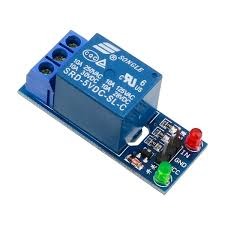
It is a 5V 1 Channel Without Light Coupling Relay. The relay normally open interface maximum load: AC 250V/10A, DC 30V/10A. It has a trigger current of 5mA, and module working voltage of DC 5V. Each channel of the module can be triggered by a jumper to set a high level or a low level. Fault-tolerant design, even if the control line is disconnected, the relay will not move. With status indicator: power (green), 1-channel relay status indicator (red). All module size interfaces can be directly connected through the terminal block, which is convenient and practical.
Features:
The 8550 transistor drive, driveability.
A fixed bolt holes for easy installation.
It has a relay status indicator led Power LED(Green), 1 relay status indicator LED(Red)
Relay control interface by single-chip IO.
Low-level suction close, high-level release.Easy to use, simple 3 line structure
Package Includes:
1 x 5V 1 Channel Without Light Coupling Relay.
Pin Connections Table 1
Board Sensor Pin Connection Relay IN board digital pin
5V 1 Channel Relay Active low - Arduino Uno
5V 1 Channel Relay Active low - Arduino Nano
5V 1 Channel Relay Active low - Arduino Mega
5V 1 Channel Relay Active low - ESP32
5V 1 Channel Relay Active low - ESP8266
5V 1 Channel Relay Active low - STM32
5V 1 Channel Relay Active low - Raspberry Pi Pico
1 //ekostra.com
2 //electronics store in egypt
3 //+201008896258
4
5 // Relay IN pins on Arduino Uno: 2 . Most cheap relay boards are ACTIVE-LOW (LOW = relay energized) - check yours.
6 const int NUM_RELAYS = 1 ;
7 int relayPins[NUM_RELAYS] = {2 };
8
9 void setup () {
10 for (int i = 0 ; i < NUM_RELAYS; i++) {
11 pinMode (relayPins[i], OUTPUT );
12 digitalWrite (relayPins[i], HIGH ); // start OFF (active-low boards: HIGH = off)
13 }
14 }
15
16 void loop () {
17 for (int i = 0 ; i < NUM_RELAYS; i++) {
18 digitalWrite (relayPins[i], LOW ); // turn ON
19 delay (500 );
20 digitalWrite (relayPins[i], HIGH ); // turn OFF
21 delay (200 );
22 }
23 delay (1000 );
24 }
1 //ekostra.com
2 //electronics store in egypt
3 //+201008896258
4
5 // Relay IN pins on Arduino Nano: 2 . Most cheap relay boards are ACTIVE-LOW (LOW = relay energized) - check yours.
6 const int NUM_RELAYS = 1 ;
7 int relayPins[NUM_RELAYS] = {2 };
8
9 void setup () {
10 for (int i = 0 ; i < NUM_RELAYS; i++) {
11 pinMode (relayPins[i], OUTPUT );
12 digitalWrite (relayPins[i], HIGH ); // start OFF (active-low boards: HIGH = off)
13 }
14 }
15
16 void loop () {
17 for (int i = 0 ; i < NUM_RELAYS; i++) {
18 digitalWrite (relayPins[i], LOW ); // turn ON
19 delay (500 );
20 digitalWrite (relayPins[i], HIGH ); // turn OFF
21 delay (200 );
22 }
23 delay (1000 );
24 }
1 //ekostra.com
2 //electronics store in egypt
3 //+201008896258
4
5 // Relay IN pins on Arduino Mega: 22 . Most cheap relay boards are ACTIVE-LOW (LOW = relay energized) - check yours.
6 const int NUM_RELAYS = 1 ;
7 int relayPins[NUM_RELAYS] = {22 };
8
9 void setup () {
10 for (int i = 0 ; i < NUM_RELAYS; i++) {
11 pinMode (relayPins[i], OUTPUT );
12 digitalWrite (relayPins[i], HIGH ); // start OFF (active-low boards: HIGH = off)
13 }
14 }
15
16 void loop () {
17 for (int i = 0 ; i < NUM_RELAYS; i++) {
18 digitalWrite (relayPins[i], LOW ); // turn ON
19 delay (500 );
20 digitalWrite (relayPins[i], HIGH ); // turn OFF
21 delay (200 );
22 }
23 delay (1000 );
24 }
1 //ekostra.com
2 //electronics store in egypt
3 //+201008896258
4
5 // Relay IN pins on ESP32: 13 . Most cheap relay boards are ACTIVE-LOW (LOW = relay energized) - check yours.
6 const int NUM_RELAYS = 1 ;
7 int relayPins[NUM_RELAYS] = {13 };
8
9 void setup () {
10 for (int i = 0 ; i < NUM_RELAYS; i++) {
11 pinMode (relayPins[i], OUTPUT );
12 digitalWrite (relayPins[i], HIGH ); // start OFF (active-low boards: HIGH = off)
13 }
14 }
15
16 void loop () {
17 for (int i = 0 ; i < NUM_RELAYS; i++) {
18 digitalWrite (relayPins[i], LOW ); // turn ON
19 delay (500 );
20 digitalWrite (relayPins[i], HIGH ); // turn OFF
21 delay (200 );
22 }
23 delay (1000 );
24 }
1 //ekostra.com
2 //electronics store in egypt
3 //+201008896258
4
5 // Relay IN pins on ESP8266: D0. Most cheap relay boards are ACTIVE-LOW (LOW = relay energized) - check yours.
6 const int NUM_RELAYS = 1 ;
7 int relayPins[NUM_RELAYS] = {D0};
8
9 void setup () {
10 for (int i = 0 ; i < NUM_RELAYS; i++) {
11 pinMode (relayPins[i], OUTPUT );
12 digitalWrite (relayPins[i], HIGH ); // start OFF (active-low boards: HIGH = off)
13 }
14 }
15
16 void loop () {
17 for (int i = 0 ; i < NUM_RELAYS; i++) {
18 digitalWrite (relayPins[i], LOW ); // turn ON
19 delay (500 );
20 digitalWrite (relayPins[i], HIGH ); // turn OFF
21 delay (200 );
22 }
23 delay (1000 );
24 }
1 //ekostra.com
2 //electronics store in egypt
3 //+201008896258
4
5 // Relay IN pins on STM32: PA0. Most cheap relay boards are ACTIVE-LOW (LOW = relay energized) - check yours.
6 const int NUM_RELAYS = 1 ;
7 int relayPins[NUM_RELAYS] = {PA0};
8
9 void setup () {
10 for (int i = 0 ; i < NUM_RELAYS; i++) {
11 pinMode (relayPins[i], OUTPUT );
12 digitalWrite (relayPins[i], HIGH ); // start OFF (active-low boards: HIGH = off)
13 }
14 }
15
16 void loop () {
17 for (int i = 0 ; i < NUM_RELAYS; i++) {
18 digitalWrite (relayPins[i], LOW ); // turn ON
19 delay (500 );
20 digitalWrite (relayPins[i], HIGH ); // turn OFF
21 delay (200 );
22 }
23 delay (1000 );
24 }
1 //ekostra.com
2 //electronics store in egypt
3 //+201008896258
4
5 // Relay IN pins on Raspberry Pi Pico: 10 . Most cheap relay boards are ACTIVE-LOW (LOW = relay energized) - check yours.
6 const int NUM_RELAYS = 1 ;
7 int relayPins[NUM_RELAYS] = {10 };
8
9 void setup () {
10 for (int i = 0 ; i < NUM_RELAYS; i++) {
11 pinMode (relayPins[i], OUTPUT );
12 digitalWrite (relayPins[i], HIGH ); // start OFF (active-low boards: HIGH = off)
13 }
14 }
15
16 void loop () {
17 for (int i = 0 ; i < NUM_RELAYS; i++) {
18 digitalWrite (relayPins[i], LOW ); // turn ON
19 delay (500 );
20 digitalWrite (relayPins[i], HIGH ); // turn OFF
21 delay (200 );
22 }
23 delay (1000 );
24 }
Project Notes: Single-channel relay module.




 Specification


