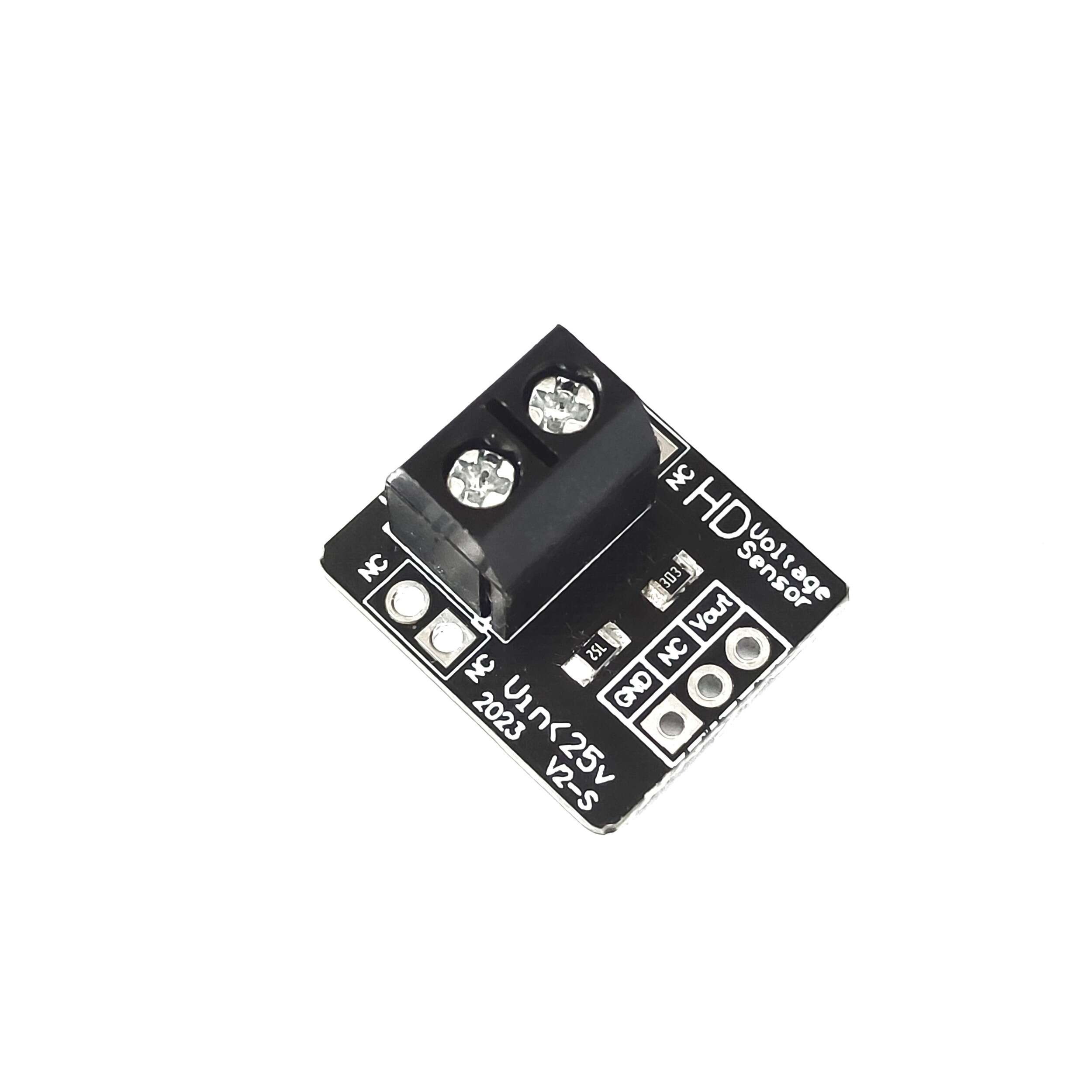
This is a simple but very useful module which uses a potential divider to reduce an input voltage by a factor of 5. The Voltage Detection Sensor Module 25V allows you to use the analog input of a microcontroller to monitor voltages much higher than it capable of sensing.
For example with a 0-5V analog input range, you are able to measure a voltage up to 25V. This voltage sensor module also includes convenient screw terminals for easy and secure connection of a wire.
This module is based on the principle of resistive voltage divider design, can make the red terminal connector input voltage to 5 times smaller. Arduino analog input voltages up to 5 v, the voltage detection module input voltage not greater than 5Vx5=25V (if using 3.3V systems, input voltage not greater than 3.3Vx5=16.5V).
Arduino AVR chips have 10-bit AD, so this module simulates a resolution of 0.00489V (5V/1023), so the minimum voltage of input voltage detection module is 0.00489Vx5=0.02445V.
Note: Keep in mind, you are restricted to voltages that are less than 25 volts. More than that and you will exceed the voltage limit of your Arduino input.
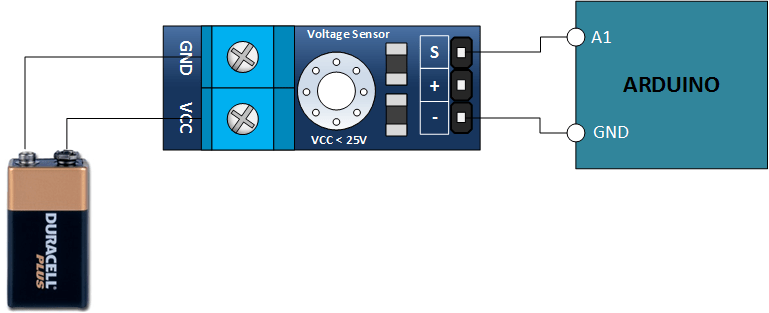
Connection Diagram Features :
Output Interface: “+ ” connected 5/3.3V, “-” connected GND, “s” connected Arduino AD pinsDC input interface: red terminal positive with VCC, negative with GNDYou can also use the IICLCD1602 LCD to display voltage.
By 3P connector, connect this module with the expansion of board Arduino, not only makes it easier for you to detect voltage battery.
Package Includes : 1×Voltage Detection Sensor Module
Pin Connections Table 1
Board Sensor Pin Connection Voltage Sensor VCC/GND/S (not used, self-powered from the measured line) / GND / board analog pin
Voltage Detection Sensor Module 25V - Arduino Uno
Voltage Detection Sensor Module 25V - Arduino Nano
Voltage Detection Sensor Module 25V - Arduino Mega
Voltage Detection Sensor Module 25V - ESP32
Voltage Detection Sensor Module 25V - ESP8266
Voltage Detection Sensor Module 25V - STM32
Voltage Detection Sensor Module 25V - Raspberry Pi Pico
1 //ekostra.com
2 //electronics store in egypt
3 //+201008896258
4
5 // Analog pin A0 on Arduino Uno
6 #define SENSOR_PIN A0
7 const float RATIO = 5.0 ; // module's own divider ratio (check your specific module's markings)
8
9 void setup () {
10 Serial.begin (115200 );
11 }
12
13 void loop () {
14 int raw = analogRead(SENSOR_PIN);
15 float voltage = raw * 5.0 / 1023.0 * RATIO;
16 Serial.print ("Voltage: "); Serial.print (voltage); Serial.println (" V");
17 delay (500 );
18 }
1 //ekostra.com
2 //electronics store in egypt
3 //+201008896258
4
5 // Analog pin A0 on Arduino Nano
6 #define SENSOR_PIN A0
7 const float RATIO = 5.0 ; // module's own divider ratio (check your specific module's markings)
8
9 void setup () {
10 Serial.begin (115200 );
11 }
12
13 void loop () {
14 int raw = analogRead(SENSOR_PIN);
15 float voltage = raw * 5.0 / 1023.0 * RATIO;
16 Serial.print ("Voltage: "); Serial.print (voltage); Serial.println (" V");
17 delay (500 );
18 }
1 //ekostra.com
2 //electronics store in egypt
3 //+201008896258
4
5 // Analog pin A0 on Arduino Mega
6 #define SENSOR_PIN A0
7 const float RATIO = 5.0 ; // module's own divider ratio (check your specific module's markings)
8
9 void setup () {
10 Serial.begin (115200 );
11 }
12
13 void loop () {
14 int raw = analogRead(SENSOR_PIN);
15 float voltage = raw * 5.0 / 1023.0 * RATIO;
16 Serial.print ("Voltage: "); Serial.print (voltage); Serial.println (" V");
17 delay (500 );
18 }
1 //ekostra.com
2 //electronics store in egypt
3 //+201008896258
4
5 // Analog pin 34 on ESP32
6 #define SENSOR_PIN 34
7 const float RATIO = 5.0 ; // module's own divider ratio (check your specific module's markings)
8
9 void setup () {
10 Serial.begin (115200 );
11 }
12
13 void loop () {
14 int raw = analogRead(SENSOR_PIN);
15 float voltage = raw * 3.3 / 4095.0 * RATIO;
16 Serial.print ("Voltage: "); Serial.print (voltage); Serial.println (" V");
17 delay (500 );
18 }
1 //ekostra.com
2 //electronics store in egypt
3 //+201008896258
4
5 // Analog pin A0 on ESP8266
6 #define SENSOR_PIN A0
7 const float RATIO = 5.0 ; // module's own divider ratio (check your specific module's markings)
8
9 void setup () {
10 Serial.begin (115200 );
11 }
12
13 void loop () {
14 int raw = analogRead(SENSOR_PIN);
15 float voltage = raw * 3.3 / 1023.0 * RATIO;
16 Serial.print ("Voltage: "); Serial.print (voltage); Serial.println (" V");
17 delay (500 );
18 }
1 //ekostra.com
2 //electronics store in egypt
3 //+201008896258
4
5 // Analog pin PA0 on STM32
6 #define SENSOR_PIN PA0
7 const float RATIO = 5.0 ; // module's own divider ratio (check your specific module's markings)
8
9 void setup () {
10 Serial.begin (115200 );
11 }
12
13 void loop () {
14 int raw = analogRead(SENSOR_PIN);
15 float voltage = raw * 3.3 / 4095.0 * RATIO;
16 Serial.print ("Voltage: "); Serial.print (voltage); Serial.println (" V");
17 delay (500 );
18 }
1 //ekostra.com
2 //electronics store in egypt
3 //+201008896258
4
5 // Analog pin 26 on Raspberry Pi Pico
6 #define SENSOR_PIN 26
7 const float RATIO = 5.0 ; // module's own divider ratio (check your specific module's markings)
8
9 void setup () {
10 Serial.begin (115200 );
11 }
12
13 void loop () {
14 int raw = analogRead(SENSOR_PIN);
15 float voltage = raw * 3.3 / 4095.0 * RATIO;
16 Serial.print ("Voltage: "); Serial.print (voltage); Serial.println (" V");
17 delay (500 );
18 }
Project Notes: Resistor-divider voltage sensor board (0-25V) - feed its output
straight into an analog pin.




 Specification


