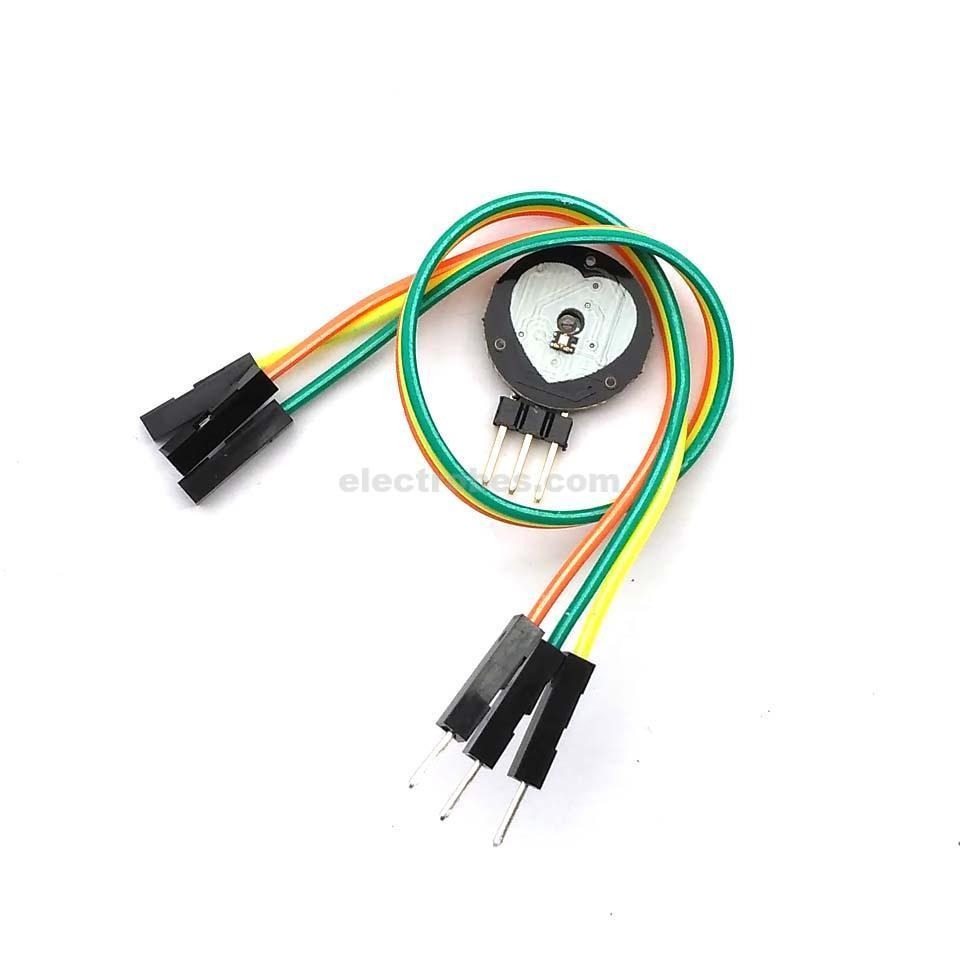
Heart Beat Pulse Sensor

  • 💓 Real-time heart rate monitoring
  • 🔌 Simple 3-pin connection (VCC, GND, Signal)
  • ⚙️ Built-in amplifier and noise filter
  • 📏 Compact 16mm circular design
  • 🤖 Compatible with Arduino, ESP32, Raspberry Pi
  • 🧠 Analog output for easy integration
  • 👆 Works on finger, earlobe, or wrist

Apple Shopping Event

Hurry and get discounts on all Apple devices up to 20%

170,00 EGP

3 People watching this product now!

Payment Methods:

Description

Heart Rate data can be used in many Electronic design and microcontroller projects. But the heart rate data is difficult to read, however, the Pulse Sensor Amped help us to read heart rate. The Heart Beat Pulse Sensor Amped is a plug-and-play heart-rate sensor for Arduino.

It can be used by students, artists, athletes, makers, and game & mobile developers who want to easily incorporate live heart-rate data into their projects.

Pulse Sensor Amped adds amplification and noise cancellation circuitry to the hardware. It’s noticeably faster and easier to get reliable pulse readings. Pulse Sensor Amped works with either a 3V or 5V Arduino.

Pulse Sensor Arduino Hookup
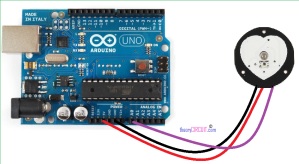
 

Connect the sensor’s power supply pins to the Arduino board supply pin as Red – 5V, Black – GND and Purple – A0 (analog input 0) its over. This Analog input reading can be displayed in the serial terminal of Arduino IDE or it can be drawn as the pulse by using Processing IDE.


Features :

  1. A Color-Coded Cable, with a standard male header connectors. Plug it straight into an Arduino or a Breadboard. No soldering is required.
  2. The Pulse Sensor has 3 holes around the outside edge which make it easy to sew it into almost anything.
  3. Visualization software (made in Processing) to instantly see the output of the sensor and for troubleshooting.

Package Includes :

1 x Heart Beat Pulse Sensor

🔌
Pin Connections
1 Table
Pin Connections Table 1
BoardSensor PinConnection
Pulse SensorS/+/-board analog pin / 3.3-5V / GND
📟
Heart Beat Pulse Sensor
7 Examples • C/C++ | Boards: Arduino Uno, Arduino Nano, Arduino Mega, ESP32, ESP8266, STM32, Raspberry Pi Pico
Heart Beat Pulse Sensor - Arduino Uno
Heart Beat Pulse Sensor - Arduino Nano
Heart Beat Pulse Sensor - Arduino Mega
Heart Beat Pulse Sensor - ESP32
Heart Beat Pulse Sensor - ESP8266
Heart Beat Pulse Sensor - STM32
Heart Beat Pulse Sensor - Raspberry Pi Pico
📄 File: heart_beat_pulse_sensor_-_arduino_uno.inoArduino Uno
320 characters
1//ekostra.com
2//electronics store in egypt
3//+201008896258
4
5// Analog pin A0 on Arduino Uno
6#define PULSE_PIN A0
7
8void setup() {
9 Serial.begin(115200);
10}
11
12void loop() {
13 int signal = analogRead(PULSE_PIN);
14 Serial.println(signal); // watch this in the Serial Plotter - each beat shows as a sharp spike
15 delay(5);
16}
📄 File: heart_beat_pulse_sensor_-_arduino_nano.inoArduino Nano
321 characters
1//ekostra.com
2//electronics store in egypt
3//+201008896258
4
5// Analog pin A0 on Arduino Nano
6#define PULSE_PIN A0
7
8void setup() {
9 Serial.begin(115200);
10}
11
12void loop() {
13 int signal = analogRead(PULSE_PIN);
14 Serial.println(signal); // watch this in the Serial Plotter - each beat shows as a sharp spike
15 delay(5);
16}
📄 File: heart_beat_pulse_sensor_-_arduino_mega.inoArduino Mega
321 characters
1//ekostra.com
2//electronics store in egypt
3//+201008896258
4
5// Analog pin A0 on Arduino Mega
6#define PULSE_PIN A0
7
8void setup() {
9 Serial.begin(115200);
10}
11
12void loop() {
13 int signal = analogRead(PULSE_PIN);
14 Serial.println(signal); // watch this in the Serial Plotter - each beat shows as a sharp spike
15 delay(5);
16}
📄 File: heart_beat_pulse_sensor_-_esp32.inoESP32
314 characters
1//ekostra.com
2//electronics store in egypt
3//+201008896258
4
5// Analog pin 34 on ESP32
6#define PULSE_PIN 34
7
8void setup() {
9 Serial.begin(115200);
10}
11
12void loop() {
13 int signal = analogRead(PULSE_PIN);
14 Serial.println(signal); // watch this in the Serial Plotter - each beat shows as a sharp spike
15 delay(5);
16}
📄 File: heart_beat_pulse_sensor_-_esp8266.inoESP8266
316 characters
1//ekostra.com
2//electronics store in egypt
3//+201008896258
4
5// Analog pin A0 on ESP8266
6#define PULSE_PIN A0
7
8void setup() {
9 Serial.begin(115200);
10}
11
12void loop() {
13 int signal = analogRead(PULSE_PIN);
14 Serial.println(signal); // watch this in the Serial Plotter - each beat shows as a sharp spike
15 delay(5);
16}
📄 File: heart_beat_pulse_sensor_-_stm32.inoSTM32
316 characters
1//ekostra.com
2//electronics store in egypt
3//+201008896258
4
5// Analog pin PA0 on STM32
6#define PULSE_PIN PA0
7
8void setup() {
9 Serial.begin(115200);
10}
11
12void loop() {
13 int signal = analogRead(PULSE_PIN);
14 Serial.println(signal); // watch this in the Serial Plotter - each beat shows as a sharp spike
15 delay(5);
16}
📄 File: heart_beat_pulse_sensor_-_raspberry_pi_pico.inoRaspberry Pi Pico
326 characters
1//ekostra.com
2//electronics store in egypt
3//+201008896258
4
5// Analog pin 26 on Raspberry Pi Pico
6#define PULSE_PIN 26
7
8void setup() {
9 Serial.begin(115200);
10}
11
12void loop() {
13 int signal = analogRead(PULSE_PIN);
14 Serial.println(signal); // watch this in the Serial Plotter - each beat shows as a sharp spike
15 delay(5);
16}
Simple analog optical pulse sensor (ear/finger clip style) - watch the analog waveform for beats.

Specification

Specification

WeightWeight6 g
Dimensions3 × 2 × 1 cm
Sensor TypeOptical Heartbeat/Pulse Sensor
InterfaceAnalog & Digital output
Operating Voltage3.3–5V DC
MaterialPCB with electronic components and photodiode
UsageHeart rate monitoring, Arduino/Raspberry Pi projects, DIY health electronics, wearable devices

Customer Reviews