[match_prediction match_id="3"]

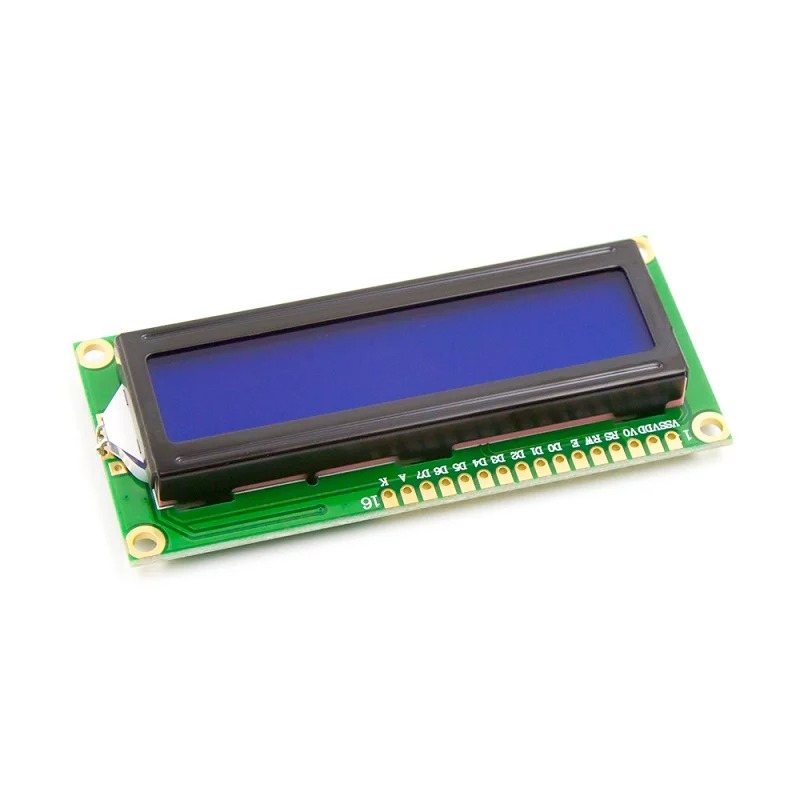
LCD1602 Parallel LCD Display with Blue Backlight

✅ 16×2 character LCD with blue backlight
✅ HD44780 compatible controller
✅ Parallel interface (4-bit/8-bit)
✅ Easy integration with Arduino and other MCUs
✅ Adjustable contrast for best viewing

SKU: AA346 Categories: ,

70,00 EGP

3 People watching this product now!

Description

If you want to add some visual output to your Arduino projects, you’ll need a display. If you need only a little to display, the LCD1602 Parallel LCD Display is a quite good solution.

This is LCD1602 Parallel LCD Display that provides a simple and cost-effective solution for adding a 16×2 White on RGB Liquid Crystal Display into your project. The display is 16 character by 2 line display that has a very clear and high contrast white text upon a blue background/backlight.

This is the great blue backlight LCD display. It is fantastic for Arduino-based projects. This LCD1602 Parallel LCD Display with Yellow Backlight is very easy to interface with Arduino or Other Microcontrollers.

The values shown on the display can be either simple text or numerical values read by the sensors, such as temperature or pressure, or even the number of cycles that the Arduino is performing.

One thing to consider is you’ll waste about 8 Pins on your Arduino for the display to get working. Luckily there exists an I2C adapter that you can solder right onto the pins of the display. So all you need to connect are the I2C pins, which show a good library and little of coding. We have the same LCD module with a pre-assembled I2C adapter, click on the name below to check it

LCD1602 Parallel LCD Display with IIC/I2C interface

To explore more displays click the link, LED/LCD Displays

Note: Header pins are not included in the package.


Features :

  1. 16 characters wide, 2 rows
  2. White text on the blue background
  3. Single LED backlight included can be dimmed easily with a resistor or PWM.
  4. Can be fully controlled with only 6 digital lines! (Any analog/digital pins can be used)

Package Includes :

1 x LCD1602 Parallel LCD Display with Blue Backlight

🔌
Pin Connections
1 Table
Pin Connections Table 1
Board NameComponent / SensorConnection Details
Arduino UnoLCD1602 DisplayVSS->GND, VDD->5V, RS->D12, RW->GND, E->D11, D4->D5, D5->D4, D6->D3, D7->D2, A->5V, K->GND
Arduino Uno10k PotentiometerLeft Pin->5V, Center Pin (Wiper)->LCD V0, Right Pin->GND
📟
LCD1602 Parallel Display
1 Example • C/C++
LCD1602 Initialization Code
Code Comments:
This code initializes the LCD in 4-bit mode and prints static text across both rows.
📄 File: lcd1602_initialization_code.inoArduino Uno
1014 characters
1/*
2 * ekostra.com
3 * ekostra electronics store in egypt
4 */
5
6// Include the standard LiquidCrystal library for parallel LCDs
7#include <LiquidCrystal.h>
8
9// Define the Arduino pins connected to the LCD control and data pins
10// RS = 12, EN = 11, D4 = 5, D5 = 4, D6 = 3, D7 = 2
11const int rs = 12, en = 11, d4 = 5, d5 = 4, d6 = 3, d7 = 2;
12
13// Initialize the LiquidCrystal library object with the specified pins
14LiquidCrystal lcd(rs, en, d4, d5, d6, d7);
15
16void setup() {
17 // Set up the LCD's number of columns and rows (16 columns, 2 rows)
18 lcd.begin(16, 2);
19
20 // Move the cursor to the first column (0) and first row (0)
21 lcd.setCursor(0, 0);
22
23 // Print the requested website name on the top row
24 lcd.print("Ekostra.com");
25
26 // Move the cursor to the first column (0) and second row (1)
27 lcd.setCursor(0, 1);
28
29 // Print the requested test message on the bottom row
30 lcd.print("Test");
31}
32
33void loop() {
34 // The loop is empty because the text is static and does not need to be refreshed continuously
35}
This project demonstrates how to connect a standard 16x2 LCD in parallel mode (4-bit) to an Arduino Uno. A 10k potentiometer is used to adjust the display contrast.
[acf_vc_integrator get_field_data_from="" field_group="25154" field_from_25154="field_694d5bea250d3" show_label="default" align="default" gallery_columns="" gm_show_placecard="default" gm_map_type_control="default" gm_fullscreen_control="default" gm_street_view_control="default" gm_zoom_control="default" gm_scale="default" hidden_field_name="ARDUINO CODE"]
هذا الوصف والمواصفات تمت كتابته بمساعدة الذكاء الاصطناعي، يُرجى مراجعته قبل الشراء.
برجاء تأكيد الطلب على الواتساب للتأكد من توفر المخزون قبل الدفع

Specification

General

WeightWeight0,0000 g
Dimensions8 × 3,6 × 1,2 cm
Product NameLCD1602 Parallel LCD Display with Blue Backlight
TypeCharacter LCD Display
ModelLCD1602
Display Type16×2 Characters (2 Rows × 16 Columns)
InterfaceParallel (HD44780 Compatible)
BacklightBlue LED
Operating Voltage5 V DC
Current Consumption20–30 mA (typical)
Viewing Angle6 o’clock (typical for standard LCD)
Operating Temperature-20°C to +70°C
ApplicationsArduino / Microcontroller Projects, DIY Electronics, Displaying Text and Data
Package Contents1× LCD1602 Parallel LCD Display with Blue Backlight

Customer Reviews