
[match_prediction match_id="3"]

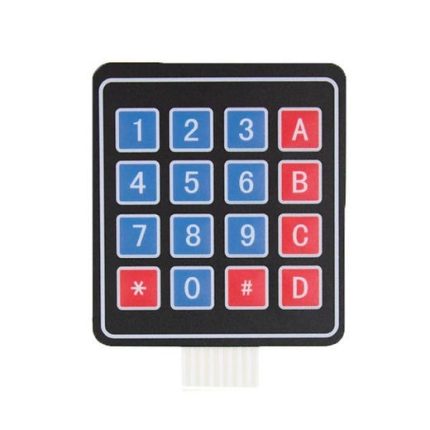
4×4 Matrix Keypad

  1. Ultra-thin design & adhesive backing provides easy integration to any project
  2. Excellent price-performance ratio
  3. Easy communication with any microcontroller
  4. 5 pins 2.54mm pitch connector, 4x 4type 16 keys.
  5. Sticker can peel off for adhesive mounting.
  6. Operating Voltage (V): 12 DC
SKU: AA084 Categories: , Tag:

35,00 EGP

17 People watching this product now!

Description

Description: Self-adhesive membrane keypad 4×4 – 16 keys

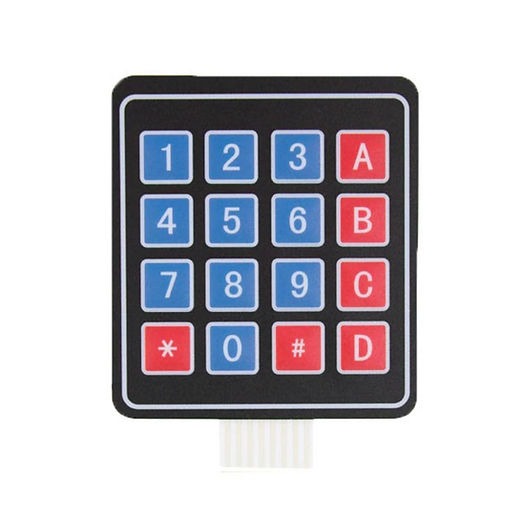
Diaphragm keypad equipped with 16 keys in 4 x 4 arrangement.It has numbers: from 0 to 9, letters: A, B, C, D and special characters: * i #. On the back of the keyboard there is a self-adhesive tape for easy installation. The keyboard is equipped with 8-pin tape with a 2.54 mm grid, so it can be connected to the main module, such as Arduino or STM32 using connection cables or through a goldpin strip.The keyboard can be used as a data input device.

Klawiatura membranowa 4x4


Membrane keyboard with 16 keys.

How to connect the keyboard

The keyboard can be connected in two ways. The layout of the outputs is shown in the figure below.

Sposób podłączenia klawiatury

Pin Number Description
ROWS
1 PIN1 is taken out from 1st  ROW
2 PIN2 is taken out from 2nd  ROW
3 PIN3 is taken out from 3rd  ROW
4 PIN4 is taken out from  4th ROW
COLUMN
5 PIN5 is taken out from 1st  COLUMN
6 PIN6 is taken out from 2nd  COLUMN
7 PIN7 is taken out from 3rd  COLUMN
8 PIN8 is taken out from 4th COLUMN


The layout of the outputs and how to connect the keyboard.

Diaphragm keypad specifications
  • Maximum Rating: 24 VDC, 30mA
  • Number of buttons: 16
  • Dimensions: 77 x 70 x 0.8 mm
  • Belt length with connector: 83 mm
  • Type of connector: 1 x 8 pin – female raster 2.54 (goldpin connector)
🔌
Pin Connections
1 Table
Pin Connections Table 1
Arduino Uno4x4 Matrix KeypadConnection Details
D9Pin 1 (Row 1)Keypad Row 1 connection
D8Pin 2 (Row 2)Keypad Row 2 connection
D7Pin 3 (Row 3)Keypad Row 3 connection
D6Pin 4 (Row 4)Keypad Row 4 connection
D5Pin 5 (Col 1)Keypad Column 1 connection
D4Pin 6 (Col 2)Keypad Column 2 connection
D3Pin 7 (Col 3)Keypad Column 3 connection
D2Pin 8 (Col 4)Keypad Column 4 connection
📟
Arduino Uno 4x4 Matrix Keypad
1 Example • C/C++
Main Keypad Reading Code
Code Comments:
This code initializes the 4x4 keypad mapping and continually scans it in the loop, printing any pressed button to the Serial Monitor.
📄 File: main_keypad_reading_code.inoArduino Uno
1417 characters
1/*
2 * ekostra.com
3 * ekostra electronics store in egypt
4 */
5
6// Include the Keypad library to handle the matrix scanning logic
7#include <Keypad.h>
8
9// Define the number of rows and columns in our matrix keypad
10const byte ROWS = 4; // 4 Rows
11const byte COLS = 4; // 4 Columns
12
13// Define the keymap based on the physical layout of the 4x4 keypad
14char hexaKeys[ROWS][COLS] = {
15 {'1', '2', '3', 'A'},
16 {'4', '5', '6', 'B'},
17 {'7', '8', '9', 'C'},
18 {'*', '0', '#', 'D'}
19};
20
21// Connect keypad ROW1, ROW2, ROW3 and ROW4 to these Arduino digital pins
22byte rowPins[ROWS] = {9, 8, 7, 6};
23
24// Connect keypad COL1, COL2, COL3 and COL4 to these Arduino digital pins
25byte colPins[COLS] = {5, 4, 3, 2};
26
27// Create a custom Keypad object with our layout and pin definitions
28Keypad customKeypad = Keypad(makeKeymap(hexaKeys), rowPins, colPins, ROWS, COLS);
29
30void setup() {
31 // Initialize serial communication at 9600 baud for PC monitoring
32 Serial.begin(9600);
33
34 // Print a startup message
35 Serial.println("4x4 Keypad Initialized. Ready for input.");
36}
37
38void loop() {
39 // Read the currently pressed key from the keypad
40 // getKey() returns a non-null char if a key is actively pressed
41 char customKey = customKeypad.getKey();
42
43 // Check if a valid key was captured
44 if (customKey) {
45 // Print the character corresponding to the pressed key
46 Serial.print("Key Pressed: ");
47 Serial.println(customKey);
48 }
49}
This project interfaces a standard 4x4 membrane keypad with an Arduino Uno. It utilizes the Keypad library to scan the rows and columns, detecting key presses and displaying the corresponding character on the Serial Monitor.
[acf_vc_integrator get_field_data_from="" field_group="25154" field_from_25154="field_694d5bea250d3" show_label="default" align="default" gallery_columns="" gm_show_placecard="default" gm_map_type_control="default" gm_fullscreen_control="default" gm_street_view_control="default" gm_zoom_control="default" gm_scale="default" hidden_field_name="ARDUINO CODE"]
هذا الوصف والمواصفات تمت كتابته بمساعدة الذكاء الاصطناعي، يُرجى مراجعته قبل الشراء.
برجاء تأكيد الطلب على الواتساب للتأكد من توفر المخزون قبل الدفع

Specification

General

WeightWeight7,0000 g
Dimensions165 × 70 × 1 cm
voltagevDC 35V
operating-current-a0.1
contact-resistance500Ω
insulation-resistance-m100
dielectric-strength250VRms

Customer Reviews