Description
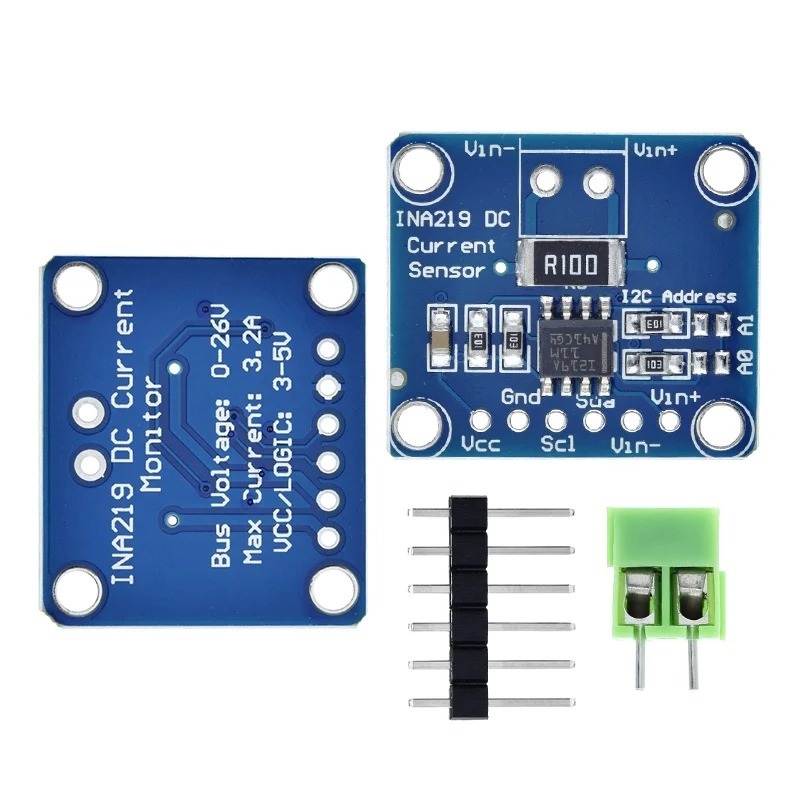
The INA219 Bi-directional DC Current Power Supply Sensor Module is a high-precision I²C interface power monitoring sensor. It can measure both current (up to ±3.2A) and bus voltage (up to 26V) , making it ideal for tracking power consumption in DIY electronics, robotics, battery management, and power supply systems. With support for 3V–5V logic , it easily interfaces with microcontrollers like Arduino, ESP32, and Raspberry Pi .
⚙️ Short Specifications
Model: INA219 Sensor Module
Operating Voltage: 3.0V – 5.5V
Bus Voltage Range: 0 – 26V DC
Current Measurement Range: ±3.2A (with 0.1Ω shunt resistor)
Interface: I²C / IIC
Resolution: 12-bit ADC
Communication Speed: Up to 400kHz
Dimensions: ~25mm x 20mm
🌟 Key Features
Bi-directional current sensing (charge & discharge).
High accuracy with built-in 12-bit ADC.
Measures bus voltage, current, and power.
Wide input voltage range up to 26V.
Onboard precision 0.1Ω shunt resistor.
Compact and easy to integrate with microcontrollers.
Ideal for battery monitoring, power supply tracking, and IoT projects.
Pin Connections Table 1
Board Sensor Pin Connection INA219 VCC/GND/SDA/SCL 3.3-5V / GND / board SDA / board SCL
INA219 I2C Bi-Directional DC Current & Power Sensor Module (3-5V) - Arduino Uno
INA219 I2C Bi-Directional DC Current & Power Sensor Module (3-5V) - Arduino Nano
INA219 I2C Bi-Directional DC Current & Power Sensor Module (3-5V) - Arduino Mega
INA219 I2C Bi-Directional DC Current & Power Sensor Module (3-5V) - ESP32
INA219 I2C Bi-Directional DC Current & Power Sensor Module (3-5V) - ESP8266
INA219 I2C Bi-Directional DC Current & Power Sensor Module (3-5V) - STM32
INA219 I2C Bi-Directional DC Current & Power Sensor Module (3-5V) - Raspberry Pi Pico
1 //ekostra.com
2 //electronics store in egypt
3 //+201008896258
4
5 // I2C wiring for Arduino Uno: A4=SDA, A5=SCL
6 #include <Wire.h>
7 #include <Adafruit_INA219.h>
8
9 Adafruit_INA219 ina219;
10
11 void setup () {
12 Serial.begin (115200 );
13 Wire.begin();
14 ina219.begin();
15 }
16
17 void loop () {
18 float shuntVoltage = ina219.getShuntVoltage_mV();
19 float busVoltage = ina219.getBusVoltage_V();
20 float current = ina219.getCurrent_mA();
21 float power = ina219.getPower_mW();
22
23 Serial.print ("Bus: "); Serial.print (busVoltage); Serial.print (" V ");
24 Serial.print ("Current: "); Serial.print (current); Serial.print (" mA ");
25 Serial.print ("Power: "); Serial.print (power); Serial.println (" mW");
26
27 delay (500 );
28 }
1 //ekostra.com
2 //electronics store in egypt
3 //+201008896258
4
5 // I2C wiring for Arduino Nano: A4=SDA, A5=SCL
6 #include <Wire.h>
7 #include <Adafruit_INA219.h>
8
9 Adafruit_INA219 ina219;
10
11 void setup () {
12 Serial.begin (115200 );
13 Wire.begin();
14 ina219.begin();
15 }
16
17 void loop () {
18 float shuntVoltage = ina219.getShuntVoltage_mV();
19 float busVoltage = ina219.getBusVoltage_V();
20 float current = ina219.getCurrent_mA();
21 float power = ina219.getPower_mW();
22
23 Serial.print ("Bus: "); Serial.print (busVoltage); Serial.print (" V ");
24 Serial.print ("Current: "); Serial.print (current); Serial.print (" mA ");
25 Serial.print ("Power: "); Serial.print (power); Serial.println (" mW");
26
27 delay (500 );
28 }
1 //ekostra.com
2 //electronics store in egypt
3 //+201008896258
4
5 // I2C wiring for Arduino Mega: D20=SDA, D21=SCL
6 #include <Wire.h>
7 #include <Adafruit_INA219.h>
8
9 Adafruit_INA219 ina219;
10
11 void setup () {
12 Serial.begin (115200 );
13 Wire.begin();
14 ina219.begin();
15 }
16
17 void loop () {
18 float shuntVoltage = ina219.getShuntVoltage_mV();
19 float busVoltage = ina219.getBusVoltage_V();
20 float current = ina219.getCurrent_mA();
21 float power = ina219.getPower_mW();
22
23 Serial.print ("Bus: "); Serial.print (busVoltage); Serial.print (" V ");
24 Serial.print ("Current: "); Serial.print (current); Serial.print (" mA ");
25 Serial.print ("Power: "); Serial.print (power); Serial.println (" mW");
26
27 delay (500 );
28 }
1 //ekostra.com
2 //electronics store in egypt
3 //+201008896258
4
5 // I2C wiring for ESP32: GPIO21=SDA, GPIO22=SCL
6 #include <Wire.h>
7 #include <Adafruit_INA219.h>
8
9 Adafruit_INA219 ina219;
10
11 void setup () {
12 Serial.begin (115200 );
13 Wire.begin();
14 ina219.begin();
15 }
16
17 void loop () {
18 float shuntVoltage = ina219.getShuntVoltage_mV();
19 float busVoltage = ina219.getBusVoltage_V();
20 float current = ina219.getCurrent_mA();
21 float power = ina219.getPower_mW();
22
23 Serial.print ("Bus: "); Serial.print (busVoltage); Serial.print (" V ");
24 Serial.print ("Current: "); Serial.print (current); Serial.print (" mA ");
25 Serial.print ("Power: "); Serial.print (power); Serial.println (" mW");
26
27 delay (500 );
28 }
1 //ekostra.com
2 //electronics store in egypt
3 //+201008896258
4
5 // I2C wiring for ESP8266: D2=SDA, D1=SCL
6 #include <Wire.h>
7 #include <Adafruit_INA219.h>
8
9 Adafruit_INA219 ina219;
10
11 void setup () {
12 Serial.begin (115200 );
13 Wire.begin();
14 ina219.begin();
15 }
16
17 void loop () {
18 float shuntVoltage = ina219.getShuntVoltage_mV();
19 float busVoltage = ina219.getBusVoltage_V();
20 float current = ina219.getCurrent_mA();
21 float power = ina219.getPower_mW();
22
23 Serial.print ("Bus: "); Serial.print (busVoltage); Serial.print (" V ");
24 Serial.print ("Current: "); Serial.print (current); Serial.print (" mA ");
25 Serial.print ("Power: "); Serial.print (power); Serial.println (" mW");
26
27 delay (500 );
28 }
1 //ekostra.com
2 //electronics store in egypt
3 //+201008896258
4
5 // I2C wiring for STM32: PB7=SDA, PB6=SCL
6 #include <Wire.h>
7 #include <Adafruit_INA219.h>
8
9 Adafruit_INA219 ina219;
10
11 void setup () {
12 Serial.begin (115200 );
13 Wire.begin();
14 ina219.begin();
15 }
16
17 void loop () {
18 float shuntVoltage = ina219.getShuntVoltage_mV();
19 float busVoltage = ina219.getBusVoltage_V();
20 float current = ina219.getCurrent_mA();
21 float power = ina219.getPower_mW();
22
23 Serial.print ("Bus: "); Serial.print (busVoltage); Serial.print (" V ");
24 Serial.print ("Current: "); Serial.print (current); Serial.print (" mA ");
25 Serial.print ("Power: "); Serial.print (power); Serial.println (" mW");
26
27 delay (500 );
28 }
1 //ekostra.com
2 //electronics store in egypt
3 //+201008896258
4
5 // I2C wiring for Raspberry Pi Pico: GPIO4=SDA, GPIO5=SCL
6 #include <Wire.h>
7 #include <Adafruit_INA219.h>
8
9 Adafruit_INA219 ina219;
10
11 void setup () {
12 Serial.begin (115200 );
13 Wire.begin();
14 ina219.begin();
15 }
16
17 void loop () {
18 float shuntVoltage = ina219.getShuntVoltage_mV();
19 float busVoltage = ina219.getBusVoltage_V();
20 float current = ina219.getCurrent_mA();
21 float power = ina219.getPower_mW();
22
23 Serial.print ("Bus: "); Serial.print (busVoltage); Serial.print (" V ");
24 Serial.print ("Current: "); Serial.print (current); Serial.print (" mA ");
25 Serial.print ("Power: "); Serial.print (power); Serial.println (" mW");
26
27 delay (500 );
28 }
Project Notes: I2C current/power/voltage monitor.




 Specification


