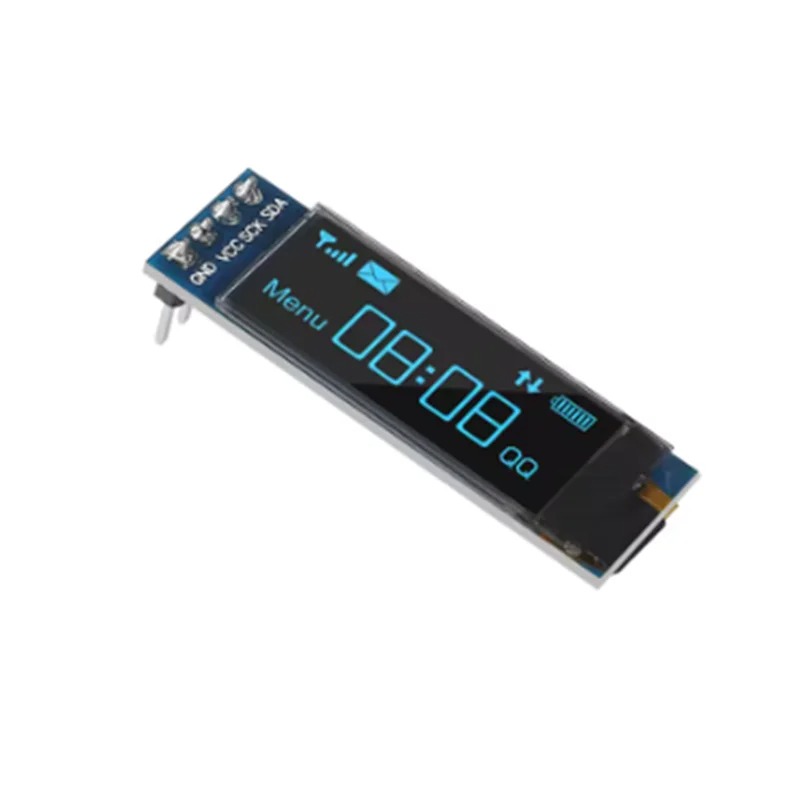
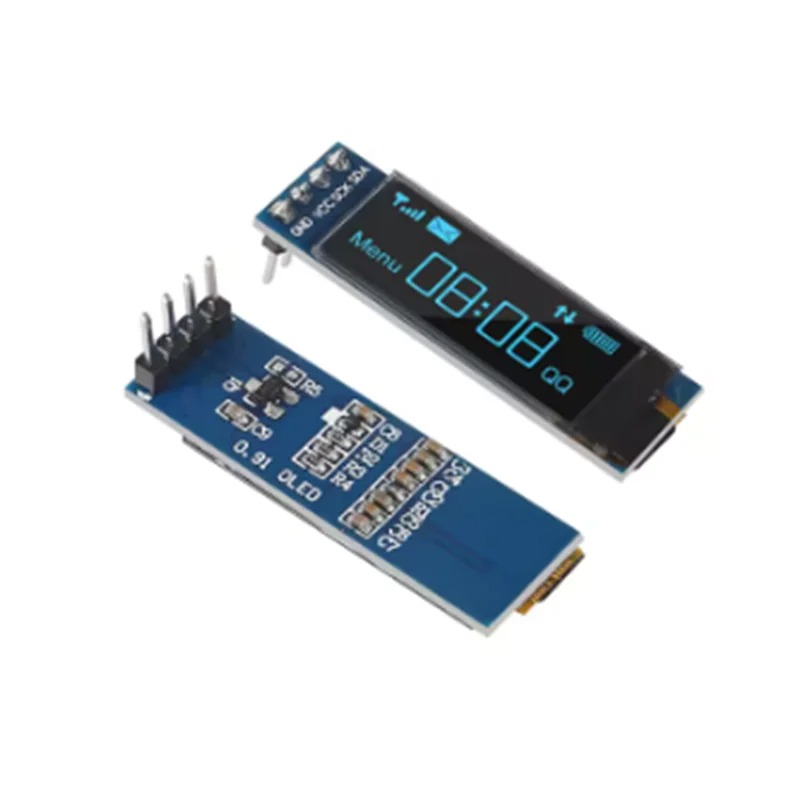
OLED LCD 0.91 INCH 128X32 I2C


Short Description

The 0.91-inch OLED (128×32) is a compact, high-contrast monochrome display module widely used in DIY electronics projects. It communicates via the I2C interface, requiring only two data wires, making it perfect for microcontrollers like Arduino, ESP32, or Raspberry Pi.

Apple Shopping Event

Hurry and get discounts on all Apple devices up to 20%

150,00 EGP

2 People watching this product now!

Payment Methods:

Description

The 0.91-inch OLED (128×32) is a compact, high-contrast monochrome display module widely used in DIY electronics projects. It communicates via the I2C interface, requiring only two data wires, making it perfect for microcontrollers like Arduino, ESP32, or Raspberry Pi.

Key Specifications

  • Resolution: 128 x 32 pixels.

  • Controller IC: Typically SSD1306.

  • Interface: I2C (Serial Clock SCL, Serial Data SDA).

  • Operating Voltage: 3.3V – 5V.

  • Display Color: White or Blue (depending on the model).

  • I2C Default Address: Usually 0x3C.

Wiring to Arduino (Uno/Nano)

Since it uses I2C, wiring is straightforward:

OLED Pin Arduino Uno/Nano Pin
VCC 5V (or 3.3V)
GND GND
SCL A5
SDA A4

Getting Started with Code

To program this display, the most common approach is using the Adafruit SSD1306 and Adafruit GFX libraries within the Arduino IDE.

  1. Install Libraries:

    • In Arduino IDE, go to Sketch -> Include Library -> Manage Libraries…

    • Search for and install “Adafruit SSD1306”.

    • Search for and install “Adafruit GFX Library”.

  2. Basic “Hello World” Example:

C++

 
#include <Wire.h>
#include <Adafruit_GFX.h>
#include <Adafruit_SSD1306.h>

#define SCREEN_WIDTH 128
#define SCREEN_HEIGHT 32

// Declaration for an SSD1306 display connected to I2C (SDA, SCL pins)
Adafruit_SSD1306 display(SCREEN_WIDTH, SCREEN_HEIGHT, &Wire, -1);

void setup() {
  // Initialize with the I2C address 0x3C
  if(!display.begin(SSD1306_SWITCHCAPVCC, 0x3C)) {
    for(;;); // Loop forever if initialization fails
  }
  
  display.clearDisplay();
  display.setTextSize(1);
  display.setTextColor(WHITE);
  display.setCursor(0, 10);
  display.println("Hello, Ekostra!");
  display.display();
}

void loop() {
  // Nothing needed here for static text
}

Pro-Tips for Your Projects

  • Addressing: If the code fails to initialize, double-check your I2C address. While 0x3C is standard, some modules use 0x3D. You can use an I2C Scanner sketch to confirm the address of your specific module.

  • Longevity: OLEDs can suffer from “burn-in” if static images are displayed at high brightness for thousands of hours. It is good practice to turn the display off or clear the screen when not in active use.

  • Library Alternatives: If you need more advanced graphics or smaller code memory footprints for more complex projects, the U8g2 library is an excellent, feature-rich alternative.

🔌
Pin Connections
1 Table
Pin Connections Table 1
BoardSensor PinConnection
OLEDVCC/GND/SDA/SCL3.3-5V / GND / board SDA / board SCL
📟
OLED LCD 0.91 INCH 128X32 I2C
7 Examples • C/C++ | Boards: Arduino Uno, Arduino Nano, Arduino Mega, ESP32, ESP8266, STM32, Raspberry Pi Pico
OLED LCD 0.91 INCH 128X32 I2C - Arduino Uno
OLED LCD 0.91 INCH 128X32 I2C - Arduino Nano
OLED LCD 0.91 INCH 128X32 I2C - Arduino Mega
OLED LCD 0.91 INCH 128X32 I2C - ESP32
OLED LCD 0.91 INCH 128X32 I2C - ESP8266
OLED LCD 0.91 INCH 128X32 I2C - STM32
OLED LCD 0.91 INCH 128X32 I2C - Raspberry Pi Pico
📄 File: oled_lcd_0.91_inch_128x32_i2c_-_arduino_uno.inoArduino Uno
693 characters
1//ekostra.com
2//electronics store in egypt
3//+201008896258
4
5// I2C wiring for Arduino Uno: A4=SDA, A5=SCL
6#include <Wire.h>
7#include <Adafruit_GFX.h>
8#include <Adafruit_SSD1306.h>
9
10#define SCREEN_WIDTH 128
11#define SCREEN_HEIGHT 32
12Adafruit_SSD1306 display(SCREEN_WIDTH, SCREEN_HEIGHT, &Wire, -1);
13
14void setup() {
15 Wire.begin();
16 display.begin(SSD1306_SWITCHCAPVCC, 0x3C);
17 display.clearDisplay();
18 display.setTextSize(1);
19 display.setTextColor(SSD1306_WHITE);
20 display.setCursor(0, 0);
21 display.println("Hello, Ekostra!");
22 display.display();
23}
24
25void loop() {
26 display.setCursor(0, 16);
27 display.print(millis() / 1000);
28 display.print(" sec ");
29 display.display();
30 delay(500);
31}
📄 File: oled_lcd_0.91_inch_128x32_i2c_-_arduino_nano.inoArduino Nano
694 characters
1//ekostra.com
2//electronics store in egypt
3//+201008896258
4
5// I2C wiring for Arduino Nano: A4=SDA, A5=SCL
6#include <Wire.h>
7#include <Adafruit_GFX.h>
8#include <Adafruit_SSD1306.h>
9
10#define SCREEN_WIDTH 128
11#define SCREEN_HEIGHT 32
12Adafruit_SSD1306 display(SCREEN_WIDTH, SCREEN_HEIGHT, &Wire, -1);
13
14void setup() {
15 Wire.begin();
16 display.begin(SSD1306_SWITCHCAPVCC, 0x3C);
17 display.clearDisplay();
18 display.setTextSize(1);
19 display.setTextColor(SSD1306_WHITE);
20 display.setCursor(0, 0);
21 display.println("Hello, Ekostra!");
22 display.display();
23}
24
25void loop() {
26 display.setCursor(0, 16);
27 display.print(millis() / 1000);
28 display.print(" sec ");
29 display.display();
30 delay(500);
31}
📄 File: oled_lcd_0.91_inch_128x32_i2c_-_arduino_mega.inoArduino Mega
696 characters
1//ekostra.com
2//electronics store in egypt
3//+201008896258
4
5// I2C wiring for Arduino Mega: D20=SDA, D21=SCL
6#include <Wire.h>
7#include <Adafruit_GFX.h>
8#include <Adafruit_SSD1306.h>
9
10#define SCREEN_WIDTH 128
11#define SCREEN_HEIGHT 32
12Adafruit_SSD1306 display(SCREEN_WIDTH, SCREEN_HEIGHT, &Wire, -1);
13
14void setup() {
15 Wire.begin();
16 display.begin(SSD1306_SWITCHCAPVCC, 0x3C);
17 display.clearDisplay();
18 display.setTextSize(1);
19 display.setTextColor(SSD1306_WHITE);
20 display.setCursor(0, 0);
21 display.println("Hello, Ekostra!");
22 display.display();
23}
24
25void loop() {
26 display.setCursor(0, 16);
27 display.print(millis() / 1000);
28 display.print(" sec ");
29 display.display();
30 delay(500);
31}
📄 File: oled_lcd_0.91_inch_128x32_i2c_-_esp32.inoESP32
695 characters
1//ekostra.com
2//electronics store in egypt
3//+201008896258
4
5// I2C wiring for ESP32: GPIO21=SDA, GPIO22=SCL
6#include <Wire.h>
7#include <Adafruit_GFX.h>
8#include <Adafruit_SSD1306.h>
9
10#define SCREEN_WIDTH 128
11#define SCREEN_HEIGHT 32
12Adafruit_SSD1306 display(SCREEN_WIDTH, SCREEN_HEIGHT, &Wire, -1);
13
14void setup() {
15 Wire.begin();
16 display.begin(SSD1306_SWITCHCAPVCC, 0x3C);
17 display.clearDisplay();
18 display.setTextSize(1);
19 display.setTextColor(SSD1306_WHITE);
20 display.setCursor(0, 0);
21 display.println("Hello, Ekostra!");
22 display.display();
23}
24
25void loop() {
26 display.setCursor(0, 16);
27 display.print(millis() / 1000);
28 display.print(" sec ");
29 display.display();
30 delay(500);
31}
📄 File: oled_lcd_0.91_inch_128x32_i2c_-_esp8266.inoESP8266
689 characters
1//ekostra.com
2//electronics store in egypt
3//+201008896258
4
5// I2C wiring for ESP8266: D2=SDA, D1=SCL
6#include <Wire.h>
7#include <Adafruit_GFX.h>
8#include <Adafruit_SSD1306.h>
9
10#define SCREEN_WIDTH 128
11#define SCREEN_HEIGHT 32
12Adafruit_SSD1306 display(SCREEN_WIDTH, SCREEN_HEIGHT, &Wire, -1);
13
14void setup() {
15 Wire.begin();
16 display.begin(SSD1306_SWITCHCAPVCC, 0x3C);
17 display.clearDisplay();
18 display.setTextSize(1);
19 display.setTextColor(SSD1306_WHITE);
20 display.setCursor(0, 0);
21 display.println("Hello, Ekostra!");
22 display.display();
23}
24
25void loop() {
26 display.setCursor(0, 16);
27 display.print(millis() / 1000);
28 display.print(" sec ");
29 display.display();
30 delay(500);
31}
📄 File: oled_lcd_0.91_inch_128x32_i2c_-_stm32.inoSTM32
689 characters
1//ekostra.com
2//electronics store in egypt
3//+201008896258
4
5// I2C wiring for STM32: PB7=SDA, PB6=SCL
6#include <Wire.h>
7#include <Adafruit_GFX.h>
8#include <Adafruit_SSD1306.h>
9
10#define SCREEN_WIDTH 128
11#define SCREEN_HEIGHT 32
12Adafruit_SSD1306 display(SCREEN_WIDTH, SCREEN_HEIGHT, &Wire, -1);
13
14void setup() {
15 Wire.begin();
16 display.begin(SSD1306_SWITCHCAPVCC, 0x3C);
17 display.clearDisplay();
18 display.setTextSize(1);
19 display.setTextColor(SSD1306_WHITE);
20 display.setCursor(0, 0);
21 display.println("Hello, Ekostra!");
22 display.display();
23}
24
25void loop() {
26 display.setCursor(0, 16);
27 display.print(millis() / 1000);
28 display.print(" sec ");
29 display.display();
30 delay(500);
31}
📄 File: oled_lcd_0.91_inch_128x32_i2c_-_raspberry_pi_pico.inoRaspberry Pi Pico
705 characters
1//ekostra.com
2//electronics store in egypt
3//+201008896258
4
5// I2C wiring for Raspberry Pi Pico: GPIO4=SDA, GPIO5=SCL
6#include <Wire.h>
7#include <Adafruit_GFX.h>
8#include <Adafruit_SSD1306.h>
9
10#define SCREEN_WIDTH 128
11#define SCREEN_HEIGHT 32
12Adafruit_SSD1306 display(SCREEN_WIDTH, SCREEN_HEIGHT, &Wire, -1);
13
14void setup() {
15 Wire.begin();
16 display.begin(SSD1306_SWITCHCAPVCC, 0x3C);
17 display.clearDisplay();
18 display.setTextSize(1);
19 display.setTextColor(SSD1306_WHITE);
20 display.setCursor(0, 0);
21 display.println("Hello, Ekostra!");
22 display.display();
23}
24
25void loop() {
26 display.setCursor(0, 16);
27 display.print(millis() / 1000);
28 display.print(" sec ");
29 display.display();
30 delay(500);
31}
I2C SSD1306 OLED, 128x32.

Specification

Specification

WeightWeight10 g
Dimensions5 × 4 × 2 cm
Resolution128 x 32 pixels
Controller ICSSD1306
InterfaceI2C (SCL, SDA)
Operating Voltage3.3V – 5V
Display ColorWhite or Blue
I2C Default Address0x3C (rarely 0x3D)

Customer Reviews