
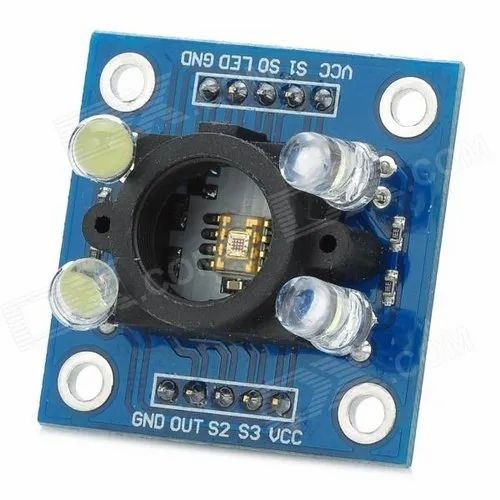
TCS3200 Color Sensor Module

  • Based on TCS3200 color light-to-frequency converter IC

  • Converts light intensity into a square wave signal

  • Supports programmable color detection (RGB + clear)

  • Directly compatible with Arduino, Raspberry Pi, and microcontrollers

  • Offers high-resolution and stable output

  • Includes power-down mode for energy efficiency

  • Built-in photodiodes with selectable filters

⚠️ Note: Shipped as either GY-31 or HW-531 (same functionality)

SKU: NB104 Categories: , Tags: ,

Apple Shopping Event

Hurry and get discounts on all Apple devices up to 20%

400,00 EGP

2 People watching this product now!

Payment Methods:

Description

GY-31 Color Sensor Module is made using IC TCS3200, a programmable color light to a frequency converter. It has configurable silicon photodiodes and a current to frequency converter in a single monolithic CMOS Integrated Circuit. Its output is a square wave having a 50% duty cycle with frequency directly proportional to irradiance (light intensity). This module can be directly interfaced with Microcontrollers, Arduino Boards, Raspberry Pi, etc.

Note: This Product is available in two different variants (GY-31 and HW-531) with the same working we will ship it randomly.


Features:

  1. High-Resolution Conversion of Light Intensity to Frequency
  2. Programmable Color and Full-Scale Output Frequency
  3. Power Down Feature
  4. Stable Temperature Coefficient
  5. Can be directly interfaced with a Microcontroller

Package Includes:

1 x GY-31 TCS3200 Color Sensor Module

🔌
Pin Connections
1 Table
Pin Connections Table 1
BoardSensor PinConnection
TCS3200VCC/GND/S0-S3/OUT3.3-5V / GND / 4 digital pins / 1 digital pin
📟
TCS3200 Color Sensor Module
7 Examples • C/C++ | Boards: Arduino Uno, Arduino Nano, Arduino Mega, ESP32, ESP8266, STM32, Raspberry Pi Pico
TCS3200 Color Sensor Module - Arduino Uno
TCS3200 Color Sensor Module - Arduino Nano
TCS3200 Color Sensor Module - Arduino Mega
TCS3200 Color Sensor Module - ESP32
TCS3200 Color Sensor Module - ESP8266
TCS3200 Color Sensor Module - STM32
TCS3200 Color Sensor Module - Raspberry Pi Pico
📄 File: tcs3200_color_sensor_module_-_arduino_uno.inoArduino Uno
867 characters
1//ekostra.com
2//electronics store in egypt
3//+201008896258
4
5// S0=4, S1=5, S2=6, S3=7, OUT=8 on Arduino Uno
6#define S0 4
7#define S1 5
8#define S2 6
9#define S3 7
10#define OUT_PIN 8
11
12void setup() {
13 Serial.begin(115200);
14 pinMode(S0, OUTPUT); pinMode(S1, OUTPUT);
15 pinMode(S2, OUTPUT); pinMode(S3, OUTPUT);
16 pinMode(OUT_PIN, INPUT);
17 digitalWrite(S0, HIGH); digitalWrite(S1, LOW); // 20% frequency scaling
18}
19
20int readColorFreq(bool s2val, bool s3val) {
21 digitalWrite(S2, s2val); digitalWrite(S3, s3val);
22 return pulseIn(OUT_PIN, LOW, 50000); // lower period = more of that color
23}
24
25void loop() {
26 int red = readColorFreq(LOW, LOW);
27 int blue = readColorFreq(LOW, HIGH);
28 int green = readColorFreq(HIGH, HIGH);
29
30 Serial.print("R:"); Serial.print(red);
31 Serial.print(" G:"); Serial.print(green);
32 Serial.print(" B:"); Serial.println(blue);
33
34 delay(200);
35}
📄 File: tcs3200_color_sensor_module_-_arduino_nano.inoArduino Nano
868 characters
1//ekostra.com
2//electronics store in egypt
3//+201008896258
4
5// S0=4, S1=5, S2=6, S3=7, OUT=8 on Arduino Nano
6#define S0 4
7#define S1 5
8#define S2 6
9#define S3 7
10#define OUT_PIN 8
11
12void setup() {
13 Serial.begin(115200);
14 pinMode(S0, OUTPUT); pinMode(S1, OUTPUT);
15 pinMode(S2, OUTPUT); pinMode(S3, OUTPUT);
16 pinMode(OUT_PIN, INPUT);
17 digitalWrite(S0, HIGH); digitalWrite(S1, LOW); // 20% frequency scaling
18}
19
20int readColorFreq(bool s2val, bool s3val) {
21 digitalWrite(S2, s2val); digitalWrite(S3, s3val);
22 return pulseIn(OUT_PIN, LOW, 50000); // lower period = more of that color
23}
24
25void loop() {
26 int red = readColorFreq(LOW, LOW);
27 int blue = readColorFreq(LOW, HIGH);
28 int green = readColorFreq(HIGH, HIGH);
29
30 Serial.print("R:"); Serial.print(red);
31 Serial.print(" G:"); Serial.print(green);
32 Serial.print(" B:"); Serial.println(blue);
33
34 delay(200);
35}
📄 File: tcs3200_color_sensor_module_-_arduino_mega.inoArduino Mega
868 characters
1//ekostra.com
2//electronics store in egypt
3//+201008896258
4
5// S0=4, S1=5, S2=6, S3=7, OUT=8 on Arduino Mega
6#define S0 4
7#define S1 5
8#define S2 6
9#define S3 7
10#define OUT_PIN 8
11
12void setup() {
13 Serial.begin(115200);
14 pinMode(S0, OUTPUT); pinMode(S1, OUTPUT);
15 pinMode(S2, OUTPUT); pinMode(S3, OUTPUT);
16 pinMode(OUT_PIN, INPUT);
17 digitalWrite(S0, HIGH); digitalWrite(S1, LOW); // 20% frequency scaling
18}
19
20int readColorFreq(bool s2val, bool s3val) {
21 digitalWrite(S2, s2val); digitalWrite(S3, s3val);
22 return pulseIn(OUT_PIN, LOW, 50000); // lower period = more of that color
23}
24
25void loop() {
26 int red = readColorFreq(LOW, LOW);
27 int blue = readColorFreq(LOW, HIGH);
28 int green = readColorFreq(HIGH, HIGH);
29
30 Serial.print("R:"); Serial.print(red);
31 Serial.print(" G:"); Serial.print(green);
32 Serial.print(" B:"); Serial.println(blue);
33
34 delay(200);
35}
📄 File: tcs3200_color_sensor_module_-_esp32.inoESP32
871 characters
1//ekostra.com
2//electronics store in egypt
3//+201008896258
4
5// S0=25, S1=26, S2=27, S3=14, OUT=12 on ESP32
6#define S0 25
7#define S1 26
8#define S2 27
9#define S3 14
10#define OUT_PIN 12
11
12void setup() {
13 Serial.begin(115200);
14 pinMode(S0, OUTPUT); pinMode(S1, OUTPUT);
15 pinMode(S2, OUTPUT); pinMode(S3, OUTPUT);
16 pinMode(OUT_PIN, INPUT);
17 digitalWrite(S0, HIGH); digitalWrite(S1, LOW); // 20% frequency scaling
18}
19
20int readColorFreq(bool s2val, bool s3val) {
21 digitalWrite(S2, s2val); digitalWrite(S3, s3val);
22 return pulseIn(OUT_PIN, LOW, 50000); // lower period = more of that color
23}
24
25void loop() {
26 int red = readColorFreq(LOW, LOW);
27 int blue = readColorFreq(LOW, HIGH);
28 int green = readColorFreq(HIGH, HIGH);
29
30 Serial.print("R:"); Serial.print(red);
31 Serial.print(" G:"); Serial.print(green);
32 Serial.print(" B:"); Serial.println(blue);
33
34 delay(200);
35}
📄 File: tcs3200_color_sensor_module_-_esp8266.inoESP8266
873 characters
1//ekostra.com
2//electronics store in egypt
3//+201008896258
4
5// S0=D0, S1=D1, S2=D2, S3=D3, OUT=D4 on ESP8266
6#define S0 D0
7#define S1 D1
8#define S2 D2
9#define S3 D3
10#define OUT_PIN D4
11
12void setup() {
13 Serial.begin(115200);
14 pinMode(S0, OUTPUT); pinMode(S1, OUTPUT);
15 pinMode(S2, OUTPUT); pinMode(S3, OUTPUT);
16 pinMode(OUT_PIN, INPUT);
17 digitalWrite(S0, HIGH); digitalWrite(S1, LOW); // 20% frequency scaling
18}
19
20int readColorFreq(bool s2val, bool s3val) {
21 digitalWrite(S2, s2val); digitalWrite(S3, s3val);
22 return pulseIn(OUT_PIN, LOW, 50000); // lower period = more of that color
23}
24
25void loop() {
26 int red = readColorFreq(LOW, LOW);
27 int blue = readColorFreq(LOW, HIGH);
28 int green = readColorFreq(HIGH, HIGH);
29
30 Serial.print("R:"); Serial.print(red);
31 Serial.print(" G:"); Serial.print(green);
32 Serial.print(" B:"); Serial.println(blue);
33
34 delay(200);
35}
📄 File: tcs3200_color_sensor_module_-_stm32.inoSTM32
881 characters
1//ekostra.com
2//electronics store in egypt
3//+201008896258
4
5// S0=PA0, S1=PA1, S2=PA2, S3=PA3, OUT=PA4 on STM32
6#define S0 PA0
7#define S1 PA1
8#define S2 PA2
9#define S3 PA3
10#define OUT_PIN PA4
11
12void setup() {
13 Serial.begin(115200);
14 pinMode(S0, OUTPUT); pinMode(S1, OUTPUT);
15 pinMode(S2, OUTPUT); pinMode(S3, OUTPUT);
16 pinMode(OUT_PIN, INPUT);
17 digitalWrite(S0, HIGH); digitalWrite(S1, LOW); // 20% frequency scaling
18}
19
20int readColorFreq(bool s2val, bool s3val) {
21 digitalWrite(S2, s2val); digitalWrite(S3, s3val);
22 return pulseIn(OUT_PIN, LOW, 50000); // lower period = more of that color
23}
24
25void loop() {
26 int red = readColorFreq(LOW, LOW);
27 int blue = readColorFreq(LOW, HIGH);
28 int green = readColorFreq(HIGH, HIGH);
29
30 Serial.print("R:"); Serial.print(red);
31 Serial.print(" G:"); Serial.print(green);
32 Serial.print(" B:"); Serial.println(blue);
33
34 delay(200);
35}
📄 File: tcs3200_color_sensor_module_-_raspberry_pi_pico.inoRaspberry Pi Pico
883 characters
1//ekostra.com
2//electronics store in egypt
3//+201008896258
4
5// S0=10, S1=11, S2=12, S3=13, OUT=14 on Raspberry Pi Pico
6#define S0 10
7#define S1 11
8#define S2 12
9#define S3 13
10#define OUT_PIN 14
11
12void setup() {
13 Serial.begin(115200);
14 pinMode(S0, OUTPUT); pinMode(S1, OUTPUT);
15 pinMode(S2, OUTPUT); pinMode(S3, OUTPUT);
16 pinMode(OUT_PIN, INPUT);
17 digitalWrite(S0, HIGH); digitalWrite(S1, LOW); // 20% frequency scaling
18}
19
20int readColorFreq(bool s2val, bool s3val) {
21 digitalWrite(S2, s2val); digitalWrite(S3, s3val);
22 return pulseIn(OUT_PIN, LOW, 50000); // lower period = more of that color
23}
24
25void loop() {
26 int red = readColorFreq(LOW, LOW);
27 int blue = readColorFreq(LOW, HIGH);
28 int green = readColorFreq(HIGH, HIGH);
29
30 Serial.print("R:"); Serial.print(red);
31 Serial.print(" G:"); Serial.print(green);
32 Serial.print(" B:"); Serial.println(blue);
33
34 delay(200);
35}
Frequency-output color sensor, same protocol as TCS230.

Specification

Specification

WeightWeight6 g
Dimensions3,2 × 2,4 × 1,8 cm
Product NameTCS3200 Color Sensor Module
TypeColor Detection Sensor Module
ModelTCS3200
Sensing MethodRGB Color Detection using Photodiodes
Output TypeFrequency Output (corresponding to color intensity)
Operating Voltage3.3–5 V DC
Light SourceWhite LEDs (for illumination)
Detection Distance2–5 cm (typical)
Operating Temperature-20°C to +70°C
MaterialPCB Module with Sensor IC and Components
ApplicationsColor Detection, Sorting Projects, Arduino / Microcontroller Projects, DIY Electronics, Robotics
Package Contents1× TCS3200 Color Sensor Module

Customer Reviews