Load Cell Sensor 5Kg

  • Measures weight/force up to 5 kg with high precision
  • Uses strain gauge technology with 4-wire Wheatstone bridge
  • Made from durable aluminum alloy for reliable performance
  • Easy to interface with HX711 24-bit ADC module for Arduino
  • Operates on 5-10V driving voltage
  • Compact design, simple installation with screw mount
  • Ideal for electronic weighing scales and force measurement applications

Apple Shopping Event

Hurry and get discounts on all Apple devices up to 20%

120,00 EGP

16 People watching this product now!

Payment Methods:

Description

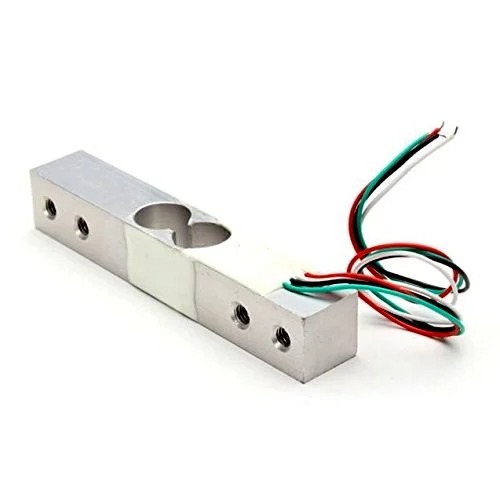
This straight bar load cell (sometimes called a strain gauge) can translate up to 10 kg of pressure (force) into an electrical signal. Each load cell is able to measure the electrical resistance that changes in response to, and proportional of, the strain (e.g. pressure or force) applied to the bar.

With this gauge, you will be able to tell just how heavy an object is, if an object’s weight changes over time, or if you simply need to sense the presence of an object by measuring strain or load applied to a surface. This straight bar load cell is made from an aluminum alloy and is capable of reading a capacity of 1KG of weight

It has Four lead wires which can be connected to  HX711 A/D Pressure Sensor.  It is easy to use with driving voltage 5-10V and produces the output voltage as per the force changes over it.

Installation of the Sensor is also a simple task, it needs to fix one end through the screw hole and the other end left floating state, according to the label indicates the direction of the gravitational force exerted particular attention must not directly push the white plastic cover part of the sensor in order to avoid damage.

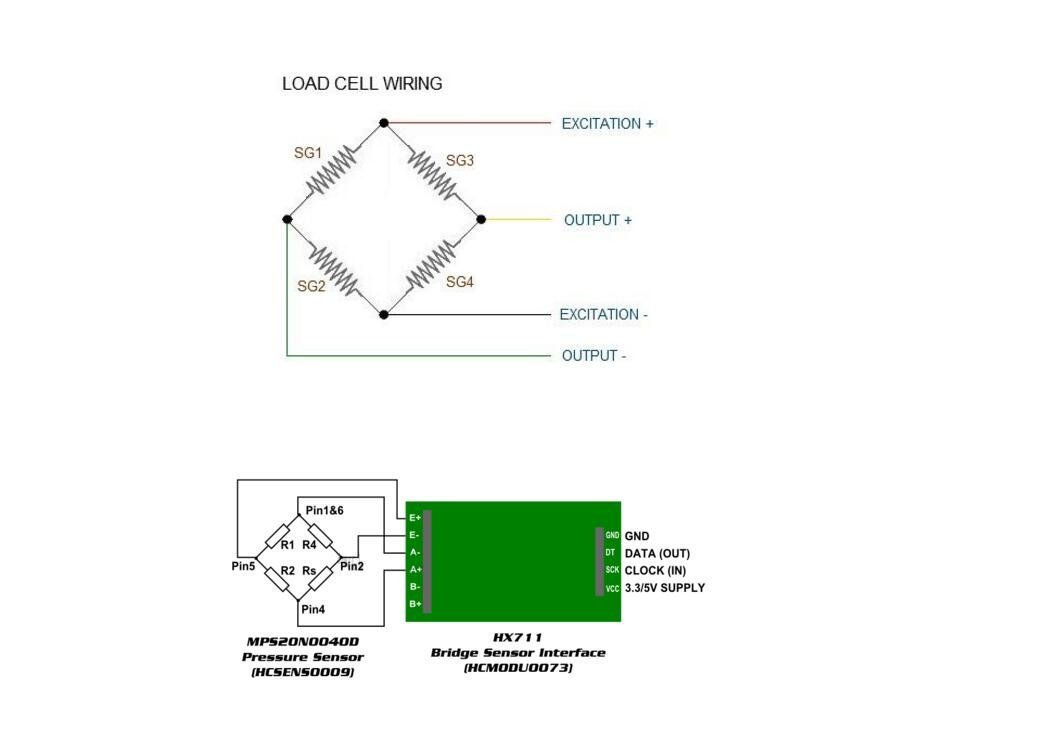
An electronic weighing machine uses a load cell to measure the load or pressure produced by the load, here most load cells follow the method of the strain gauge, Which converts the pressure (force) into an electrical signal, these load cells have four strain gauges that are hooked up in a Wheatstone bridge formation.

When we apply to load the strain gauge resistance will change and hence the output voltage from the load cell get changes by the way we can measure the load value.


Wheatstone bridge formation of Load Cell:

510Ihq5Hshl._Sl1038_


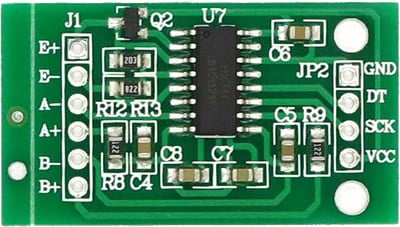
HX711 (24 bit Analog to Digital Converter)

HX 711 is a precision 24-bit analog to digital converter (ADC) specially designed for weighing scales and industrial control applications to interface directly with a bridge sensor.

Hx711

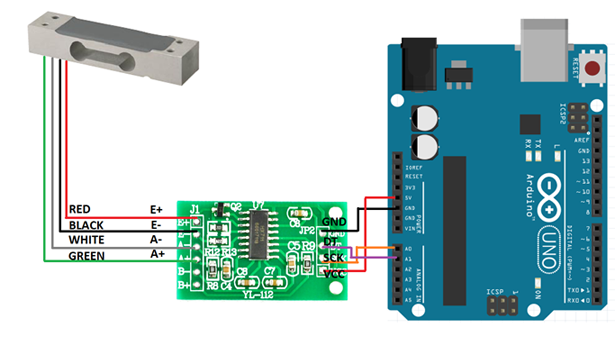
Simply connect Load cell wires to the HX711 module based on their color, then connect DAT (Data) pin to Arduino Analog pin A1 and connect CLK (Clock) pin to Arduin0 Analog pin A0, Put Vcc and GND supply from Arduino power source pins.

Weight_Tutorial_Content1


Package Includes :

1 x YZC-133 Weighing Load Cell Sensor 10kg For Electronic Weighing Scale
🔌
Pin Connections
1 Table
Pin Connections Table 1
BoardSensor PinConnection
Load CellRed/Black/White/Greento HX711 E+/E-/A-/A+ respectively
📟
Load Cell Sensor 5Kg
7 Examples • C/C++ | Boards: Arduino Uno, Arduino Nano, Arduino Mega, ESP32, ESP8266, STM32, Raspberry Pi Pico
Load Cell Sensor 5Kg - Arduino Uno
Load Cell Sensor 5Kg - Arduino Nano
Load Cell Sensor 5Kg - Arduino Mega
Load Cell Sensor 5Kg - ESP32
Load Cell Sensor 5Kg - ESP8266
Load Cell Sensor 5Kg - STM32
Load Cell Sensor 5Kg - Raspberry Pi Pico
📄 File: load_cell_sensor_5kg_-_arduino_uno.inoArduino Uno
806 characters
1//ekostra.com
2//electronics store in egypt
3//+201008896258
4
5// DT=3, SCK=2 on Arduino Uno
6#include <HX711.h>
7
8#define LOADCELL_DOUT_PIN 3
9#define LOADCELL_SCK_PIN 2
10
11HX711 scale;
12
13void setup() {
14 Serial.begin(115200);
15 scale.begin(LOADCELL_DOUT_PIN, LOADCELL_SCK_PIN);
16 scale.set_scale(); // replace with your own calibration factor once known
17 scale.tare(); // zero the scale with no load on it
18 Serial.println("Scale ready - place a known weight and adjust the calibration factor.");
19}
20
21void loop() {
22 if (scale.is_ready()) {
23 float reading = scale.get_units(10); // average of 10 readings
24 Serial.print("Weight: "); Serial.print(reading); Serial.println(" (raw scale units - calibrate to grams/kg)");
25 } else {
26 Serial.println("HX711 not found.");
27 }
28 delay(300);
29}
📄 File: load_cell_sensor_5kg_-_arduino_nano.inoArduino Nano
807 characters
1//ekostra.com
2//electronics store in egypt
3//+201008896258
4
5// DT=3, SCK=2 on Arduino Nano
6#include <HX711.h>
7
8#define LOADCELL_DOUT_PIN 3
9#define LOADCELL_SCK_PIN 2
10
11HX711 scale;
12
13void setup() {
14 Serial.begin(115200);
15 scale.begin(LOADCELL_DOUT_PIN, LOADCELL_SCK_PIN);
16 scale.set_scale(); // replace with your own calibration factor once known
17 scale.tare(); // zero the scale with no load on it
18 Serial.println("Scale ready - place a known weight and adjust the calibration factor.");
19}
20
21void loop() {
22 if (scale.is_ready()) {
23 float reading = scale.get_units(10); // average of 10 readings
24 Serial.print("Weight: "); Serial.print(reading); Serial.println(" (raw scale units - calibrate to grams/kg)");
25 } else {
26 Serial.println("HX711 not found.");
27 }
28 delay(300);
29}
📄 File: load_cell_sensor_5kg_-_arduino_mega.inoArduino Mega
807 characters
1//ekostra.com
2//electronics store in egypt
3//+201008896258
4
5// DT=3, SCK=2 on Arduino Mega
6#include <HX711.h>
7
8#define LOADCELL_DOUT_PIN 3
9#define LOADCELL_SCK_PIN 2
10
11HX711 scale;
12
13void setup() {
14 Serial.begin(115200);
15 scale.begin(LOADCELL_DOUT_PIN, LOADCELL_SCK_PIN);
16 scale.set_scale(); // replace with your own calibration factor once known
17 scale.tare(); // zero the scale with no load on it
18 Serial.println("Scale ready - place a known weight and adjust the calibration factor.");
19}
20
21void loop() {
22 if (scale.is_ready()) {
23 float reading = scale.get_units(10); // average of 10 readings
24 Serial.print("Weight: "); Serial.print(reading); Serial.println(" (raw scale units - calibrate to grams/kg)");
25 } else {
26 Serial.println("HX711 not found.");
27 }
28 delay(300);
29}
📄 File: load_cell_sensor_5kg_-_esp32.inoESP32
802 characters
1//ekostra.com
2//electronics store in egypt
3//+201008896258
4
5// DT=16, SCK=4 on ESP32
6#include <HX711.h>
7
8#define LOADCELL_DOUT_PIN 16
9#define LOADCELL_SCK_PIN 4
10
11HX711 scale;
12
13void setup() {
14 Serial.begin(115200);
15 scale.begin(LOADCELL_DOUT_PIN, LOADCELL_SCK_PIN);
16 scale.set_scale(); // replace with your own calibration factor once known
17 scale.tare(); // zero the scale with no load on it
18 Serial.println("Scale ready - place a known weight and adjust the calibration factor.");
19}
20
21void loop() {
22 if (scale.is_ready()) {
23 float reading = scale.get_units(10); // average of 10 readings
24 Serial.print("Weight: "); Serial.print(reading); Serial.println(" (raw scale units - calibrate to grams/kg)");
25 } else {
26 Serial.println("HX711 not found.");
27 }
28 delay(300);
29}
📄 File: load_cell_sensor_5kg_-_esp8266.inoESP8266
806 characters
1//ekostra.com
2//electronics store in egypt
3//+201008896258
4
5// DT=D2, SCK=D1 on ESP8266
6#include <HX711.h>
7
8#define LOADCELL_DOUT_PIN D2
9#define LOADCELL_SCK_PIN D1
10
11HX711 scale;
12
13void setup() {
14 Serial.begin(115200);
15 scale.begin(LOADCELL_DOUT_PIN, LOADCELL_SCK_PIN);
16 scale.set_scale(); // replace with your own calibration factor once known
17 scale.tare(); // zero the scale with no load on it
18 Serial.println("Scale ready - place a known weight and adjust the calibration factor.");
19}
20
21void loop() {
22 if (scale.is_ready()) {
23 float reading = scale.get_units(10); // average of 10 readings
24 Serial.print("Weight: "); Serial.print(reading); Serial.println(" (raw scale units - calibrate to grams/kg)");
25 } else {
26 Serial.println("HX711 not found.");
27 }
28 delay(300);
29}
📄 File: load_cell_sensor_5kg_-_stm32.inoSTM32
808 characters
1//ekostra.com
2//electronics store in egypt
3//+201008896258
4
5// DT=PB6, SCK=PB7 on STM32
6#include <HX711.h>
7
8#define LOADCELL_DOUT_PIN PB6
9#define LOADCELL_SCK_PIN PB7
10
11HX711 scale;
12
13void setup() {
14 Serial.begin(115200);
15 scale.begin(LOADCELL_DOUT_PIN, LOADCELL_SCK_PIN);
16 scale.set_scale(); // replace with your own calibration factor once known
17 scale.tare(); // zero the scale with no load on it
18 Serial.println("Scale ready - place a known weight and adjust the calibration factor.");
19}
20
21void loop() {
22 if (scale.is_ready()) {
23 float reading = scale.get_units(10); // average of 10 readings
24 Serial.print("Weight: "); Serial.print(reading); Serial.println(" (raw scale units - calibrate to grams/kg)");
25 } else {
26 Serial.println("HX711 not found.");
27 }
28 delay(300);
29}
📄 File: load_cell_sensor_5kg_-_raspberry_pi_pico.inoRaspberry Pi Pico
812 characters
1//ekostra.com
2//electronics store in egypt
3//+201008896258
4
5// DT=6, SCK=7 on Raspberry Pi Pico
6#include <HX711.h>
7
8#define LOADCELL_DOUT_PIN 6
9#define LOADCELL_SCK_PIN 7
10
11HX711 scale;
12
13void setup() {
14 Serial.begin(115200);
15 scale.begin(LOADCELL_DOUT_PIN, LOADCELL_SCK_PIN);
16 scale.set_scale(); // replace with your own calibration factor once known
17 scale.tare(); // zero the scale with no load on it
18 Serial.println("Scale ready - place a known weight and adjust the calibration factor.");
19}
20
21void loop() {
22 if (scale.is_ready()) {
23 float reading = scale.get_units(10); // average of 10 readings
24 Serial.print("Weight: "); Serial.print(reading); Serial.println(" (raw scale units - calibrate to grams/kg)");
25 } else {
26 Serial.println("HX711 not found.");
27 }
28 delay(300);
29}
Strain-gauge load cell - needs the HX711 amplifier/ADC module wired alongside it.

Specification

Specification

WeightWeight6 g
Dimensions6 × 2 × 1,5 cm
Product NameLoad Cell Sensor – 5 Kg
TypeStrain Gauge Load Cell
Maximum Load Capacity5 Kg
Output TypeAnalog (mV/V)
Excitation Voltage5–10 V DC
MaterialAlloy Steel / Stainless Steel
Accuracy±0.1–0.2% Full Scale (typical)
Mounting TypeThrough-Hole / Screw Mount
Operating Temperature-10°C to +40°C
ApplicationsWeighing Scales, Arduino / Microcontroller Projects, DIY Weight Measurement, Robotics
Package Contents1× Load Cell Sensor – 5 Kg

Customer Reviews