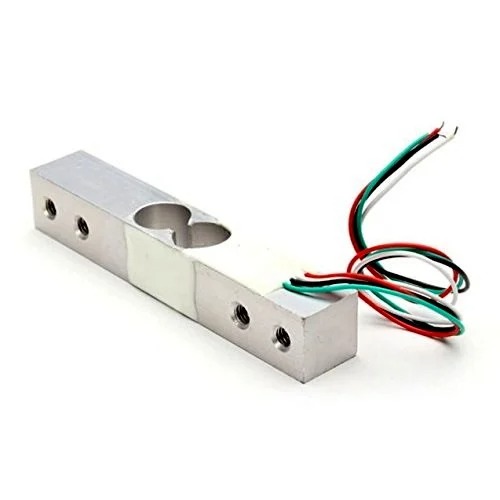
This weighing Load Cell Sensor (sometimes called a strain gauge) can translate up to 1 kg of pressure (force) into an electrical signal. Each load cell is able to measure the electrical resistance that changes in response to, and proportional of, the strain (e.g. pressure or force) applied to the bar.
With this gauge, you will be able to tell just how heavy an object is, if an object’s weight changes over time, or if you simply need to sense the presence of an object by measuring strain or load applied to a surface. This straight bar load cell is made from an aluminum alloy and is capable of reading a capacity of 1KG of weight
It has Four lead wires which can be connected to HX711 A/D Pressure Sensor. It is easy to use with driving voltage 5-10V and produce the output voltage as per the force changes over it.
Installation of the Sensor is also the simple task, it needs to fix one end through the screw hole and the other end left floating state, according to the label indicates the direction of the gravitational force exerted particular attention must not directly push the white plastic cover part of the sensor in order to avoid damage.
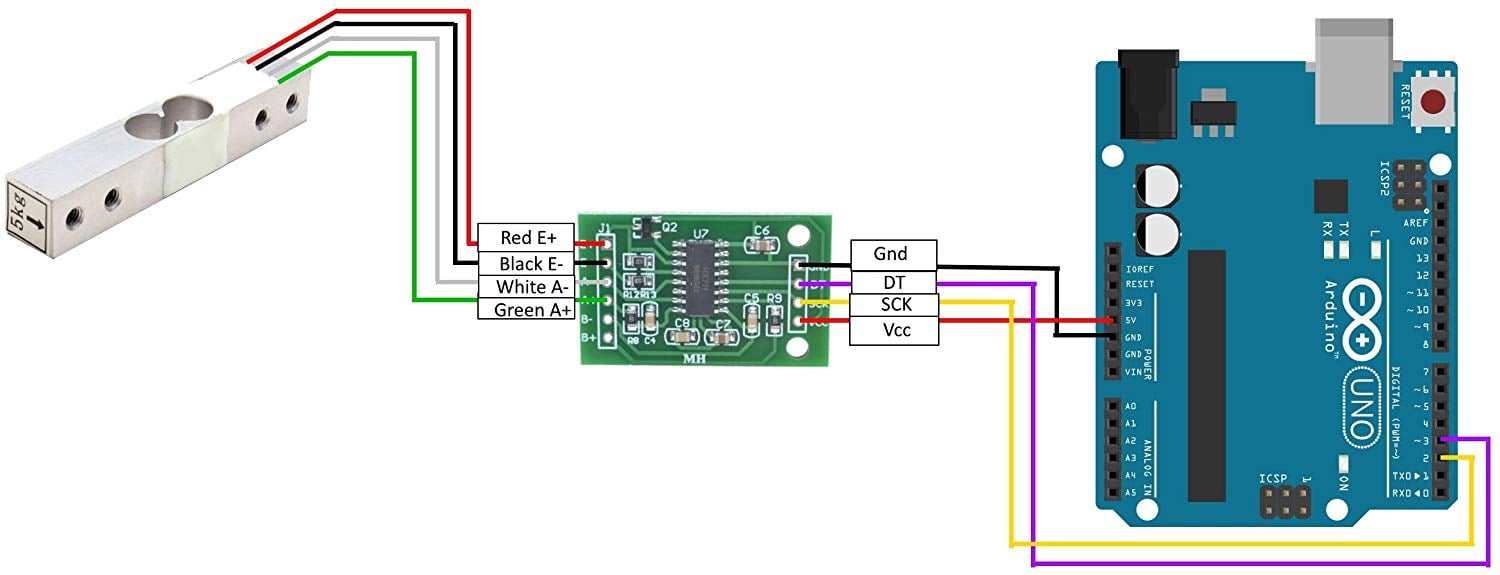
Connection Diagram with Arduino via HX711:
Package Includes: 1 x Weighing Load Cell Sensor 1Kg for Electronic Scale
Pin Connections Table 1
Board Sensor Pin Connection Load Cell Red/Black/White/Green to HX711 E+/E-/A-/A+ respectively
Load Cell Sensor 1Kg - Arduino Uno
Load Cell Sensor 1Kg - Arduino Nano
Load Cell Sensor 1Kg - Arduino Mega
Load Cell Sensor 1Kg - ESP32
Load Cell Sensor 1Kg - ESP8266
Load Cell Sensor 1Kg - STM32
Load Cell Sensor 1Kg - Raspberry Pi Pico
1 //ekostra.com
2 //electronics store in egypt
3 //+201008896258
4
5 // DT=3 , SCK=2 on Arduino Uno
6 #include <HX711.h>
7
8 #define LOADCELL_DOUT_PIN 3
9 #define LOADCELL_SCK_PIN 2
10
11 HX711 scale;
12
13 void setup () {
14 Serial.begin (115200 );
15 scale.begin(LOADCELL_DOUT_PIN, LOADCELL_SCK_PIN);
16 scale.set_scale(); // replace with your own calibration factor once known
17 scale.tare(); // zero the scale with no load on it
18 Serial.println ("Scale ready - place a known weight and adjust the calibration factor.");
19 }
20
21 void loop () {
22 if (scale.is_ready()) {
23 float reading = scale.get_units(10 ); // average of 10 readings
24 Serial.print ("Weight: "); Serial.print (reading); Serial.println (" (raw scale units - calibrate to grams/kg)");
25 } else {
26 Serial.println ("HX711 not found.");
27 }
28 delay (300 );
29 }
1 //ekostra.com
2 //electronics store in egypt
3 //+201008896258
4
5 // DT=3 , SCK=2 on Arduino Nano
6 #include <HX711.h>
7
8 #define LOADCELL_DOUT_PIN 3
9 #define LOADCELL_SCK_PIN 2
10
11 HX711 scale;
12
13 void setup () {
14 Serial.begin (115200 );
15 scale.begin(LOADCELL_DOUT_PIN, LOADCELL_SCK_PIN);
16 scale.set_scale(); // replace with your own calibration factor once known
17 scale.tare(); // zero the scale with no load on it
18 Serial.println ("Scale ready - place a known weight and adjust the calibration factor.");
19 }
20
21 void loop () {
22 if (scale.is_ready()) {
23 float reading = scale.get_units(10 ); // average of 10 readings
24 Serial.print ("Weight: "); Serial.print (reading); Serial.println (" (raw scale units - calibrate to grams/kg)");
25 } else {
26 Serial.println ("HX711 not found.");
27 }
28 delay (300 );
29 }
1 //ekostra.com
2 //electronics store in egypt
3 //+201008896258
4
5 // DT=3 , SCK=2 on Arduino Mega
6 #include <HX711.h>
7
8 #define LOADCELL_DOUT_PIN 3
9 #define LOADCELL_SCK_PIN 2
10
11 HX711 scale;
12
13 void setup () {
14 Serial.begin (115200 );
15 scale.begin(LOADCELL_DOUT_PIN, LOADCELL_SCK_PIN);
16 scale.set_scale(); // replace with your own calibration factor once known
17 scale.tare(); // zero the scale with no load on it
18 Serial.println ("Scale ready - place a known weight and adjust the calibration factor.");
19 }
20
21 void loop () {
22 if (scale.is_ready()) {
23 float reading = scale.get_units(10 ); // average of 10 readings
24 Serial.print ("Weight: "); Serial.print (reading); Serial.println (" (raw scale units - calibrate to grams/kg)");
25 } else {
26 Serial.println ("HX711 not found.");
27 }
28 delay (300 );
29 }
1 //ekostra.com
2 //electronics store in egypt
3 //+201008896258
4
5 // DT=16 , SCK=4 on ESP32
6 #include <HX711.h>
7
8 #define LOADCELL_DOUT_PIN 16
9 #define LOADCELL_SCK_PIN 4
10
11 HX711 scale;
12
13 void setup () {
14 Serial.begin (115200 );
15 scale.begin(LOADCELL_DOUT_PIN, LOADCELL_SCK_PIN);
16 scale.set_scale(); // replace with your own calibration factor once known
17 scale.tare(); // zero the scale with no load on it
18 Serial.println ("Scale ready - place a known weight and adjust the calibration factor.");
19 }
20
21 void loop () {
22 if (scale.is_ready()) {
23 float reading = scale.get_units(10 ); // average of 10 readings
24 Serial.print ("Weight: "); Serial.print (reading); Serial.println (" (raw scale units - calibrate to grams/kg)");
25 } else {
26 Serial.println ("HX711 not found.");
27 }
28 delay (300 );
29 }
1 //ekostra.com
2 //electronics store in egypt
3 //+201008896258
4
5 // DT=D2, SCK=D1 on ESP8266
6 #include <HX711.h>
7
8 #define LOADCELL_DOUT_PIN D2
9 #define LOADCELL_SCK_PIN D1
10
11 HX711 scale;
12
13 void setup () {
14 Serial.begin (115200 );
15 scale.begin(LOADCELL_DOUT_PIN, LOADCELL_SCK_PIN);
16 scale.set_scale(); // replace with your own calibration factor once known
17 scale.tare(); // zero the scale with no load on it
18 Serial.println ("Scale ready - place a known weight and adjust the calibration factor.");
19 }
20
21 void loop () {
22 if (scale.is_ready()) {
23 float reading = scale.get_units(10 ); // average of 10 readings
24 Serial.print ("Weight: "); Serial.print (reading); Serial.println (" (raw scale units - calibrate to grams/kg)");
25 } else {
26 Serial.println ("HX711 not found.");
27 }
28 delay (300 );
29 }
1 //ekostra.com
2 //electronics store in egypt
3 //+201008896258
4
5 // DT=PB6, SCK=PB7 on STM32
6 #include <HX711.h>
7
8 #define LOADCELL_DOUT_PIN PB6
9 #define LOADCELL_SCK_PIN PB7
10
11 HX711 scale;
12
13 void setup () {
14 Serial.begin (115200 );
15 scale.begin(LOADCELL_DOUT_PIN, LOADCELL_SCK_PIN);
16 scale.set_scale(); // replace with your own calibration factor once known
17 scale.tare(); // zero the scale with no load on it
18 Serial.println ("Scale ready - place a known weight and adjust the calibration factor.");
19 }
20
21 void loop () {
22 if (scale.is_ready()) {
23 float reading = scale.get_units(10 ); // average of 10 readings
24 Serial.print ("Weight: "); Serial.print (reading); Serial.println (" (raw scale units - calibrate to grams/kg)");
25 } else {
26 Serial.println ("HX711 not found.");
27 }
28 delay (300 );
29 }
1 //ekostra.com
2 //electronics store in egypt
3 //+201008896258
4
5 // DT=6 , SCK=7 on Raspberry Pi Pico
6 #include <HX711.h>
7
8 #define LOADCELL_DOUT_PIN 6
9 #define LOADCELL_SCK_PIN 7
10
11 HX711 scale;
12
13 void setup () {
14 Serial.begin (115200 );
15 scale.begin(LOADCELL_DOUT_PIN, LOADCELL_SCK_PIN);
16 scale.set_scale(); // replace with your own calibration factor once known
17 scale.tare(); // zero the scale with no load on it
18 Serial.println ("Scale ready - place a known weight and adjust the calibration factor.");
19 }
20
21 void loop () {
22 if (scale.is_ready()) {
23 float reading = scale.get_units(10 ); // average of 10 readings
24 Serial.print ("Weight: "); Serial.print (reading); Serial.println (" (raw scale units - calibrate to grams/kg)");
25 } else {
26 Serial.println ("HX711 not found.");
27 }
28 delay (300 );
29 }
Project Notes: Strain-gauge load cell - needs the HX711 amplifier/ADC module wired alongside it (shown here).




 Specification


