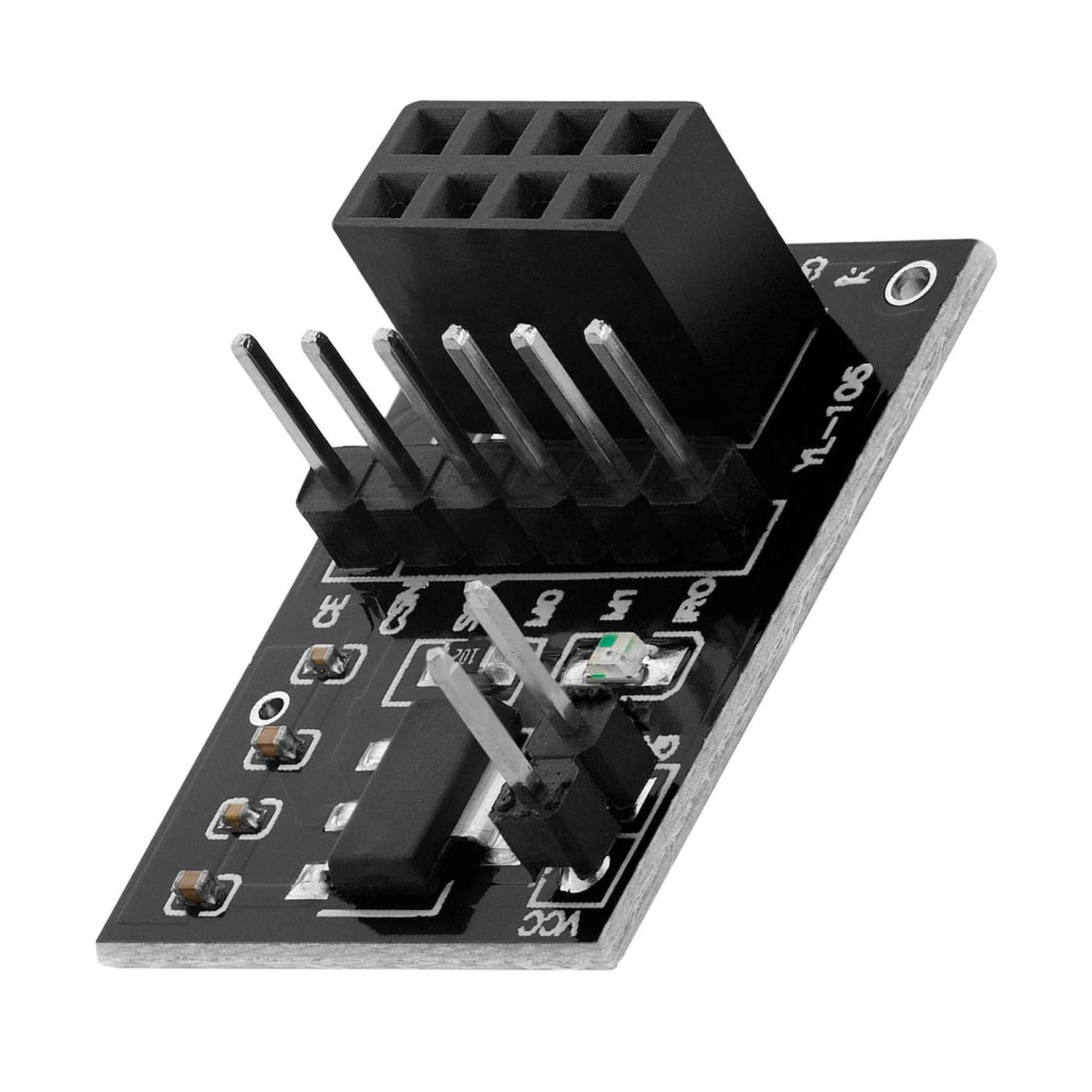
This NRF24L01 Adapter Board is designed to provide a stable 3.3V power supply for the NRF24L01 wireless transceiver module. Since the NRF24L01 is sensitive to voltage fluctuations, this adapter ensures reliable performance by regulating voltage and filtering noise. It easily connects to standard microcontroller boards like Arduino, making wireless communication projects more stable and efficient.
Specifications
Compatible Module: NRF24L01 / NRF24L01+
Input Voltage: 5V DC
Output Voltage: 3.3V regulated
Interface: Standard 8-pin NRF24L01 socket
Onboard Components: Voltage regulator, filter capacitors
Connection Type: Pin headers (for breadboard/Arduino)
Material: PCB board with electronic components
Dimensions: Compact mini size
Features
Provides stable 3.3V power for NRF24L01 module
Reduces noise and improves wireless signal stability
Easy plug-and-play design
Protects module from voltage damage
Compatible with Arduino and other microcontrollers
Compact and lightweight for embedded projects
Ideal for IoT, wireless communication, and DIY electronics
Pin Connections Table 1
Board Sensor Pin Connection nRF24L01 + Adapter VCC/GND/CE/CSN 5V (adapter regulates it) / GND / board digital pin / board digital pin
Adapter Board for NRF24L01 Wireless Module 3.3V - Arduino Uno
Adapter Board for NRF24L01 Wireless Module 3.3V - Arduino Nano
Adapter Board for NRF24L01 Wireless Module 3.3V - Arduino Mega
Adapter Board for NRF24L01 Wireless Module 3.3V - ESP32
Adapter Board for NRF24L01 Wireless Module 3.3V - ESP8266
Adapter Board for NRF24L01 Wireless Module 3.3V - STM32
Adapter Board for NRF24L01 Wireless Module 3.3V - Raspberry Pi Pico
1 //ekostra.com
2 //electronics store in egypt
3 //+201008896258
4
5 // CE=9 , CSN=10 on Arduino Uno (MOSI/MISO/SCK use the board's default hardware SPI pins)
6 #include <SPI.h>
7 #include <RF24.h>
8
9 RF24 radio(9 , 10 );
10 const byte address[6 ] = "1Node";
11
12 void setup () {
13 Serial.begin (115200 );
14 radio.begin();
15 radio.openWritingPipe(address);
16 radio.setPALevel(RF24_PA_LOW);
17 radio.stopListening();
18 }
19
20 void loop () {
21 const char text[] = "Hello from Ekostra";
22 radio.write(&text, sizeof(text));
23 delay (1000 );
24 }
1 //ekostra.com
2 //electronics store in egypt
3 //+201008896258
4
5 // CE=9 , CSN=10 on Arduino Nano (MOSI/MISO/SCK use the board's default hardware SPI pins)
6 #include <SPI.h>
7 #include <RF24.h>
8
9 RF24 radio(9 , 10 );
10 const byte address[6 ] = "1Node";
11
12 void setup () {
13 Serial.begin (115200 );
14 radio.begin();
15 radio.openWritingPipe(address);
16 radio.setPALevel(RF24_PA_LOW);
17 radio.stopListening();
18 }
19
20 void loop () {
21 const char text[] = "Hello from Ekostra";
22 radio.write(&text, sizeof(text));
23 delay (1000 );
24 }
1 //ekostra.com
2 //electronics store in egypt
3 //+201008896258
4
5 // CE=9 , CSN=10 on Arduino Mega (MOSI/MISO/SCK use the board's default hardware SPI pins)
6 #include <SPI.h>
7 #include <RF24.h>
8
9 RF24 radio(9 , 10 );
10 const byte address[6 ] = "1Node";
11
12 void setup () {
13 Serial.begin (115200 );
14 radio.begin();
15 radio.openWritingPipe(address);
16 radio.setPALevel(RF24_PA_LOW);
17 radio.stopListening();
18 }
19
20 void loop () {
21 const char text[] = "Hello from Ekostra";
22 radio.write(&text, sizeof(text));
23 delay (1000 );
24 }
1 //ekostra.com
2 //electronics store in egypt
3 //+201008896258
4
5 // CE=4 , CSN=5 on ESP32 (MOSI/MISO/SCK use the board's default hardware SPI pins)
6 #include <SPI.h>
7 #include <RF24.h>
8
9 RF24 radio(4 , 5 );
10 const byte address[6 ] = "1Node";
11
12 void setup () {
13 Serial.begin (115200 );
14 radio.begin();
15 radio.openWritingPipe(address);
16 radio.setPALevel(RF24_PA_LOW);
17 radio.stopListening();
18 }
19
20 void loop () {
21 const char text[] = "Hello from Ekostra";
22 radio.write(&text, sizeof(text));
23 delay (1000 );
24 }
1 //ekostra.com
2 //electronics store in egypt
3 //+201008896258
4
5 // CE=D3, CSN=D8 on ESP8266 (MOSI/MISO/SCK use the board's default hardware SPI pins)
6 #include <SPI.h>
7 #include <RF24.h>
8
9 RF24 radio(D3, D8);
10 const byte address[6 ] = "1Node";
11
12 void setup () {
13 Serial.begin (115200 );
14 radio.begin();
15 radio.openWritingPipe(address);
16 radio.setPALevel(RF24_PA_LOW);
17 radio.stopListening();
18 }
19
20 void loop () {
21 const char text[] = "Hello from Ekostra";
22 radio.write(&text, sizeof(text));
23 delay (1000 );
24 }
1 //ekostra.com
2 //electronics store in egypt
3 //+201008896258
4
5 // CE=PB0, CSN=PA4 on STM32 (MOSI/MISO/SCK use the board's default hardware SPI pins)
6 #include <SPI.h>
7 #include <RF24.h>
8
9 RF24 radio(PB0, PA4);
10 const byte address[6 ] = "1Node";
11
12 void setup () {
13 Serial.begin (115200 );
14 radio.begin();
15 radio.openWritingPipe(address);
16 radio.setPALevel(RF24_PA_LOW);
17 radio.stopListening();
18 }
19
20 void loop () {
21 const char text[] = "Hello from Ekostra";
22 radio.write(&text, sizeof(text));
23 delay (1000 );
24 }
1 //ekostra.com
2 //electronics store in egypt
3 //+201008896258
4
5 // CE=20 , CSN=17 on Raspberry Pi Pico (MOSI/MISO/SCK use the board's default hardware SPI pins)
6 #include <SPI.h>
7 #include <RF24.h>
8
9 RF24 radio(20 , 17 );
10 const byte address[6 ] = "1Node";
11
12 void setup () {
13 Serial.begin (115200 );
14 radio.begin();
15 radio.openWritingPipe(address);
16 radio.setPALevel(RF24_PA_LOW);
17 radio.stopListening();
18 }
19
20 void loop () {
21 const char text[] = "Hello from Ekostra";
22 radio.write(&text, sizeof(text));
23 delay (1000 );
24 }
Project Notes: Voltage-regulator adapter that lets an nRF24L01 run safely from a 5V supply - the SPI wiring/code is identical to a bare nRF24L01.




 Specification


