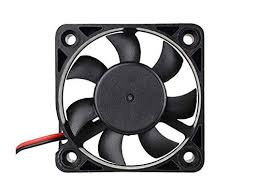
DC Fan 5v (8x8cm)

Apple Shopping Event

Hurry and get discounts on all Apple devices up to 20%

55,00 EGP

6 People watching this product now!

Payment Methods:

Description

Keep your electronics running cool with this compact 5V DC brushless cooling fan, sized 80x80mm (8x8cm). Designed for reliable, continuous airflow in low-voltage projects, this fan is a popular choice for cooling Raspberry Pi enclosures, 3D printer electronics, small project boxes, power supply units, LED driver enclosures, and other DIY electronics builds where heat buildup needs to be managed.

Built with a brushless DC motor, this fan offers quiet operation, low power draw, and a long service life compared to brushed alternatives. The square frame with corner mounting holes makes it easy to install into standard 80mm fan cutouts, project enclosures, or 3D-printed brackets. With simple 2-wire (red/black) connection, it’s straightforward to wire directly to a 5V power source or connect through a header on your control board.

Whether you’re building a custom PC-style cooling setup, ventilating an electronics enclosure, or adding active cooling to a maker project, this 5V 80mm fan delivers dependable airflow in a compact footprint.

Key Features

  • 5V DC Operation – Runs directly off standard 5V rails (USB, Raspberry Pi, Arduino power supplies)
  • 80x80mm (8x8cm) Size – Standard fan size, compatible with common enclosure cutouts and brackets
  • Brushless Motor – Quiet operation with longer lifespan and lower power consumption
  • 2-Wire Connection – Simple red (+) / black (–) wiring for easy integration
  • Compact & Lightweight – Fits easily into small project enclosures and tight spaces
  • Corner Mounting Holes – Standard 4-hole mounting pattern for secure installation
  • Continuous Airflow – Helps prevent overheating in enclosed electronics projects
  • Wide Compatibility – Ideal for Raspberry Pi, 3D printers, PSUs, LED drivers, and custom builds

Specifications

Specification Detail
Voltage 5V DC
Size 80mm x 80mm x (thickness — confirm with supplier, typically 10-25mm)
Motor Type Brushless DC
Wiring 2-wire (Red: +, Black: –)
Frame Material Plastic (PBT/ABS housing)
Mounting 4 corner mounting holes
Connector Bare wire leads (confirm if connector/header included)
Bearing Type (confirm: sleeve/ball bearing — affects lifespan & noise)
Airflow Direction Standard front-to-back exhaust
Application Raspberry Pi, 3D printers, enclosures, PSUs, LED drivers, DIY electronics

Suggested Package Includes

  • 1x DC Cooling Fan (5V, 80x80mm)
🔌
Pin Connections
1 Table
Pin Connections Table 1
BoardSensor PinConnection
Fanto switching transistorfan lead into a transistor switch gated by a board pin
📟
DC Fan 5v (8x8cm)
7 Examples • C/C++ | Boards: Arduino Uno, Arduino Nano, Arduino Mega, ESP32, ESP8266, STM32, Raspberry Pi Pico
DC Fan 5v (8x8cm) - Arduino Uno
DC Fan 5v (8x8cm) - Arduino Nano
DC Fan 5v (8x8cm) - Arduino Mega
DC Fan 5v (8x8cm) - ESP32
DC Fan 5v (8x8cm) - ESP8266
DC Fan 5v (8x8cm) - STM32
DC Fan 5v (8x8cm) - Raspberry Pi Pico
📄 File: dc_fan_5v_(8x8cm)_-_arduino_uno.inoArduino Uno
460 characters
1//ekostra.com
2//electronics store in egypt
3//+201008896258
4
5// Switch through an NPN transistor/MOSFET (never drive a fan straight from a GPIO pin) - PWM pin 9 on Arduino Uno for speed control, or just digitalWrite HIGH/LOW for simple on/off.
6#define FAN_PIN 9
7
8void setup() {
9 Serial.begin(115200);
10 pinMode(FAN_PIN, OUTPUT);
11}
12
13void loop() {
14 analogWrite(FAN_PIN, 180); // ~70% speed
15 delay(5000);
16 analogWrite(FAN_PIN, 0); // off
17 delay(5000);
18}
📄 File: dc_fan_5v_(8x8cm)_-_arduino_nano.inoArduino Nano
461 characters
1//ekostra.com
2//electronics store in egypt
3//+201008896258
4
5// Switch through an NPN transistor/MOSFET (never drive a fan straight from a GPIO pin) - PWM pin 9 on Arduino Nano for speed control, or just digitalWrite HIGH/LOW for simple on/off.
6#define FAN_PIN 9
7
8void setup() {
9 Serial.begin(115200);
10 pinMode(FAN_PIN, OUTPUT);
11}
12
13void loop() {
14 analogWrite(FAN_PIN, 180); // ~70% speed
15 delay(5000);
16 analogWrite(FAN_PIN, 0); // off
17 delay(5000);
18}
📄 File: dc_fan_5v_(8x8cm)_-_arduino_mega.inoArduino Mega
461 characters
1//ekostra.com
2//electronics store in egypt
3//+201008896258
4
5// Switch through an NPN transistor/MOSFET (never drive a fan straight from a GPIO pin) - PWM pin 9 on Arduino Mega for speed control, or just digitalWrite HIGH/LOW for simple on/off.
6#define FAN_PIN 9
7
8void setup() {
9 Serial.begin(115200);
10 pinMode(FAN_PIN, OUTPUT);
11}
12
13void loop() {
14 analogWrite(FAN_PIN, 180); // ~70% speed
15 delay(5000);
16 analogWrite(FAN_PIN, 0); // off
17 delay(5000);
18}
📄 File: dc_fan_5v_(8x8cm)_-_esp32.inoESP32
456 characters
1//ekostra.com
2//electronics store in egypt
3//+201008896258
4
5// Switch through an NPN transistor/MOSFET (never drive a fan straight from a GPIO pin) - PWM pin 25 on ESP32 for speed control, or just digitalWrite HIGH/LOW for simple on/off.
6#define FAN_PIN 25
7
8void setup() {
9 Serial.begin(115200);
10 pinMode(FAN_PIN, OUTPUT);
11}
12
13void loop() {
14 analogWrite(FAN_PIN, 180); // ~70% speed
15 delay(5000);
16 analogWrite(FAN_PIN, 0); // off
17 delay(5000);
18}
📄 File: dc_fan_5v_(8x8cm)_-_esp8266.inoESP8266
458 characters
1//ekostra.com
2//electronics store in egypt
3//+201008896258
4
5// Switch through an NPN transistor/MOSFET (never drive a fan straight from a GPIO pin) - PWM pin D1 on ESP8266 for speed control, or just digitalWrite HIGH/LOW for simple on/off.
6#define FAN_PIN D1
7
8void setup() {
9 Serial.begin(115200);
10 pinMode(FAN_PIN, OUTPUT);
11}
12
13void loop() {
14 analogWrite(FAN_PIN, 180); // ~70% speed
15 delay(5000);
16 analogWrite(FAN_PIN, 0); // off
17 delay(5000);
18}
📄 File: dc_fan_5v_(8x8cm)_-_stm32.inoSTM32
458 characters
1//ekostra.com
2//electronics store in egypt
3//+201008896258
4
5// Switch through an NPN transistor/MOSFET (never drive a fan straight from a GPIO pin) - PWM pin PA8 on STM32 for speed control, or just digitalWrite HIGH/LOW for simple on/off.
6#define FAN_PIN PA8
7
8void setup() {
9 Serial.begin(115200);
10 pinMode(FAN_PIN, OUTPUT);
11}
12
13void loop() {
14 analogWrite(FAN_PIN, 180); // ~70% speed
15 delay(5000);
16 analogWrite(FAN_PIN, 0); // off
17 delay(5000);
18}
📄 File: dc_fan_5v_(8x8cm)_-_raspberry_pi_pico.inoRaspberry Pi Pico
468 characters
1//ekostra.com
2//electronics store in egypt
3//+201008896258
4
5// Switch through an NPN transistor/MOSFET (never drive a fan straight from a GPIO pin) - PWM pin 15 on Raspberry Pi Pico for speed control, or just digitalWrite HIGH/LOW for simple on/off.
6#define FAN_PIN 15
7
8void setup() {
9 Serial.begin(115200);
10 pinMode(FAN_PIN, OUTPUT);
11}
12
13void loop() {
14 analogWrite(FAN_PIN, 180); // ~70% speed
15 delay(5000);
16 analogWrite(FAN_PIN, 0); // off
17 delay(5000);
18}
Small 5V brushed fan.

Specification

Specification

WeightWeight10 g
Dimensions5 × 4 × 2 cm
Dimensions80mm × 80mm × 25mm
Rated Voltage5V DC
Operating Voltage Range4.5V ~ 5.5V DC
Wiring Configuration2-Wire (Red: VCC Positive, Black: GND Negative)
Blade Design7-Blade Impeller
Rated Current0.20A, 200mA
Power Consumption1.0W
Speed2500 RPM ~ 2800 RPM
Airflow32 CFM ~ 40 CFM
Noise Level≤ 28 dBA
Bearing TypeSleeve Bearing, Hydraulic Bearing
Housing MaterialHigh-Density PBT Plastic
Mounting4x Unthreaded Corner Holes
Applications3D Printer Mainboards, Arduino & ESP32 Enclosures, Custom Electronics Cooling

Customer Reviews