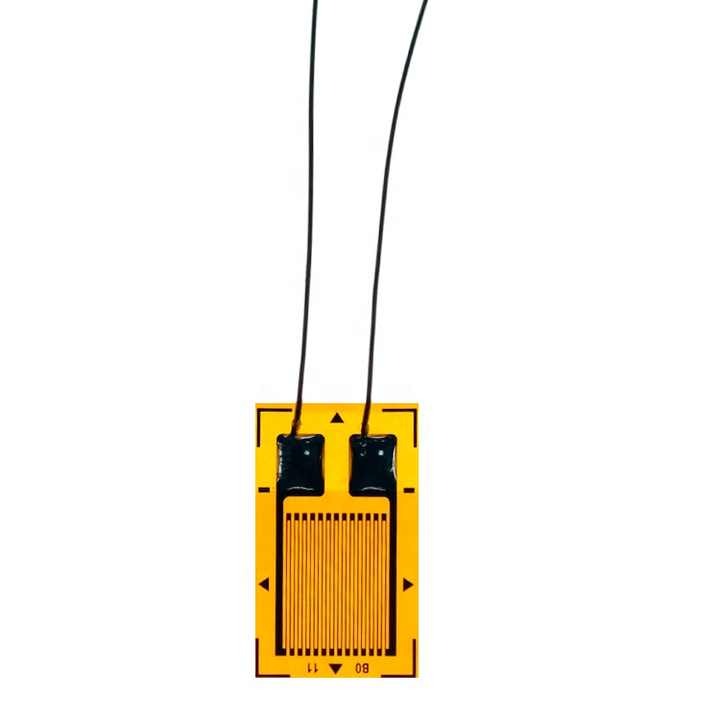
High-accuracy BF120-3AA strain gauges designed for load cell applications. Provides reliable and precise strain measurements in various engineering and testing scenarios. Ideal for mechanical stress analysis and load monitoring systems.
Specifications
Resistance : 120ΩType : Precision strain gaugeModel : BF120-3AAMaterial : High-quality foilGauge Factor : 2.0 ± 1%Temperature Range : -20°C to +80°CDimensions : 3mm x 5mm grid size (typical)
Features
High precision and sensitivity
Stable performance under varying conditions
Compact design for easy integration
Compatible with load cells and testing equipment
Excellent thermal stability for consistent results
Durable construction for long-term use
Pin Connections Table 1
Board Sensor Pin Connection Strain Gauge to bridge -> HX711 wire into a Wheatstone bridge, then HX711 E+/E-/A+/A-
BF120-3AA Precision Strain Gauges (120Ohm) for Load Cells - Arduino Uno
BF120-3AA Precision Strain Gauges (120Ohm) for Load Cells - Arduino Nano
BF120-3AA Precision Strain Gauges (120Ohm) for Load Cells - Arduino Mega
BF120-3AA Precision Strain Gauges (120Ohm) for Load Cells - ESP32
BF120-3AA Precision Strain Gauges (120Ohm) for Load Cells - ESP8266
BF120-3AA Precision Strain Gauges (120Ohm) for Load Cells - STM32
BF120-3AA Precision Strain Gauges (120Ohm) for Load Cells - Raspberry Pi Pico
1 //ekostra.com
2 //electronics store in egypt
3 //+201008896258
4
5 // DT=3 , SCK=2 on Arduino Uno
6 #include <HX711.h>
7
8 #define LOADCELL_DOUT_PIN 3
9 #define LOADCELL_SCK_PIN 2
10
11 HX711 scale;
12
13 void setup () {
14 Serial.begin (115200 );
15 scale.begin(LOADCELL_DOUT_PIN, LOADCELL_SCK_PIN);
16 scale.set_scale();
17 scale.tare();
18 }
19
20 void loop () {
21 if (scale.is_ready()) {
22 Serial.print ("Reading: "); Serial.println (scale.get_units(10 ));
23 }
24 delay (300 );
25 }
1 //ekostra.com
2 //electronics store in egypt
3 //+201008896258
4
5 // DT=3 , SCK=2 on Arduino Nano
6 #include <HX711.h>
7
8 #define LOADCELL_DOUT_PIN 3
9 #define LOADCELL_SCK_PIN 2
10
11 HX711 scale;
12
13 void setup () {
14 Serial.begin (115200 );
15 scale.begin(LOADCELL_DOUT_PIN, LOADCELL_SCK_PIN);
16 scale.set_scale();
17 scale.tare();
18 }
19
20 void loop () {
21 if (scale.is_ready()) {
22 Serial.print ("Reading: "); Serial.println (scale.get_units(10 ));
23 }
24 delay (300 );
25 }
1 //ekostra.com
2 //electronics store in egypt
3 //+201008896258
4
5 // DT=3 , SCK=2 on Arduino Mega
6 #include <HX711.h>
7
8 #define LOADCELL_DOUT_PIN 3
9 #define LOADCELL_SCK_PIN 2
10
11 HX711 scale;
12
13 void setup () {
14 Serial.begin (115200 );
15 scale.begin(LOADCELL_DOUT_PIN, LOADCELL_SCK_PIN);
16 scale.set_scale();
17 scale.tare();
18 }
19
20 void loop () {
21 if (scale.is_ready()) {
22 Serial.print ("Reading: "); Serial.println (scale.get_units(10 ));
23 }
24 delay (300 );
25 }
1 //ekostra.com
2 //electronics store in egypt
3 //+201008896258
4
5 // DT=16 , SCK=4 on ESP32
6 #include <HX711.h>
7
8 #define LOADCELL_DOUT_PIN 16
9 #define LOADCELL_SCK_PIN 4
10
11 HX711 scale;
12
13 void setup () {
14 Serial.begin (115200 );
15 scale.begin(LOADCELL_DOUT_PIN, LOADCELL_SCK_PIN);
16 scale.set_scale();
17 scale.tare();
18 }
19
20 void loop () {
21 if (scale.is_ready()) {
22 Serial.print ("Reading: "); Serial.println (scale.get_units(10 ));
23 }
24 delay (300 );
25 }
1 //ekostra.com
2 //electronics store in egypt
3 //+201008896258
4
5 // DT=D2, SCK=D1 on ESP8266
6 #include <HX711.h>
7
8 #define LOADCELL_DOUT_PIN D2
9 #define LOADCELL_SCK_PIN D1
10
11 HX711 scale;
12
13 void setup () {
14 Serial.begin (115200 );
15 scale.begin(LOADCELL_DOUT_PIN, LOADCELL_SCK_PIN);
16 scale.set_scale();
17 scale.tare();
18 }
19
20 void loop () {
21 if (scale.is_ready()) {
22 Serial.print ("Reading: "); Serial.println (scale.get_units(10 ));
23 }
24 delay (300 );
25 }
1 //ekostra.com
2 //electronics store in egypt
3 //+201008896258
4
5 // DT=PB6, SCK=PB7 on STM32
6 #include <HX711.h>
7
8 #define LOADCELL_DOUT_PIN PB6
9 #define LOADCELL_SCK_PIN PB7
10
11 HX711 scale;
12
13 void setup () {
14 Serial.begin (115200 );
15 scale.begin(LOADCELL_DOUT_PIN, LOADCELL_SCK_PIN);
16 scale.set_scale();
17 scale.tare();
18 }
19
20 void loop () {
21 if (scale.is_ready()) {
22 Serial.print ("Reading: "); Serial.println (scale.get_units(10 ));
23 }
24 delay (300 );
25 }
1 //ekostra.com
2 //electronics store in egypt
3 //+201008896258
4
5 // DT=6 , SCK=7 on Raspberry Pi Pico
6 #include <HX711.h>
7
8 #define LOADCELL_DOUT_PIN 6
9 #define LOADCELL_SCK_PIN 7
10
11 HX711 scale;
12
13 void setup () {
14 Serial.begin (115200 );
15 scale.begin(LOADCELL_DOUT_PIN, LOADCELL_SCK_PIN);
16 scale.set_scale();
17 scale.tare();
18 }
19
20 void loop () {
21 if (scale.is_ready()) {
22 Serial.print ("Reading: "); Serial.println (scale.get_units(10 ));
23 }
24 delay (300 );
25 }
Project Notes: Bare strain gauge - typically built into a Wheatstone bridge and read via an HX711 amplifier, same as a load cell.




 Specification


