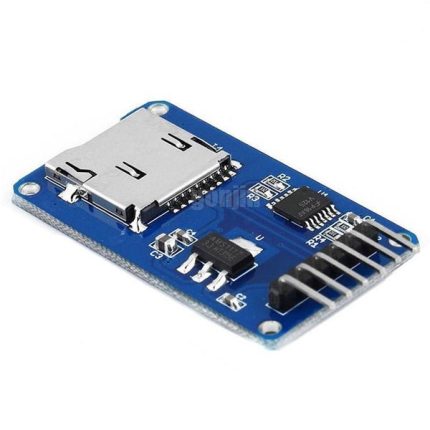

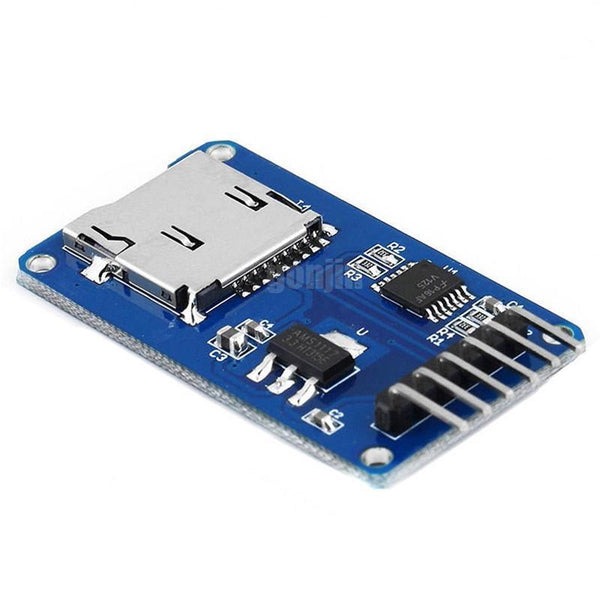
Micro SD Card Reader Module
- 📁 microSD/microSDHC Support – Works with FAT16/FAT32 file systems.
- 🔌 SPI Communication – Standard 4-pin interface (MISO, MOSI, SCK, CS).
- ⚡ 3.3V Regulator – Accepts 3.3V or 5V power input.
- 🛡️ Level Shifting – Safe for 5V microcontrollers (Arduino, ESP32, etc.).
- 🧩 Compact Design – Fits easily on breadboards and PCBs.
- 🔧 Applications – Ideal for data logging, IoT, media storage, and embedded systems.
60,00 EGP
In stock
In stock
Payment Methods:
Description
Product Description
The Micro SD Card Reader Module is a compact and versatile interface board designed to easily connect micro SD cards to microcontrollers and development boards such as Arduino, ESP32, Raspberry Pi, STM32, and more. It allows your project to read and write data to a micro SD card using standard digital communication protocols.
Ideal for data logging, audio projects, storage expansion, and file management, this module provides an easy way to integrate removable storage into your electronics project. With clearly labeled pins and a stable card socket, the module ensures reliable performance and convenient use in both prototypes and finished designs.
✨ Key Features
-
Supports micro SD and micro SDHC cards (commonly up to 32 GB and higher depending on controller)
-
SPI communication interface — easy to use with most microcontrollers
-
Standard 4-pin interface (MOSI, MISO, SCK, CS)
-
VCC and GND pins for power
-
On-board level shifting (on some models) for 3.3 V and 5 V compatibility
-
Push-in card socket for secure insertion and removal
-
Compact and breadboard-friendly design
-
Ideal for data logging, file storage, and multimedia projects
📐 Technical Specifications
-
Card Type Supported: micro SD, micro SDHC (and potentially SDXC depending on host support)
-
Interface: SPI (Serial Peripheral Interface)
-
Voltage:
-
VCC: Typically 3.3 V (many modules include regulator/level shifter to accept 5 V)
-
Signal Levels: 3.3 V logic (level shifting may be onboard)
-
-
Pins:
-
VCC – Power
-
GND – Ground
-
MOSI (DI) – Data Input
-
MISO (DO) – Data Output
-
SCK – Serial Clock
-
CS – Chip Select
-
-
Card Holder: Spring-loaded slot for micro SD card
-
Board Size: Small, compact form factor
🧰 Typical Applications
-
Data logging for sensors (temperature, pressure, GPS, etc.)
-
File storage for microcontroller projects
-
Recording and playback of audio or images
-
IoT devices requiring local storage
-
Robotics and control systems needing external memory
-
Educational and prototype development
🛠️ How it Works (Quick Overview)
-
Insert a micro SD card into the slot securely.
-
Connect the module to your microcontroller using SPI pins (MOSI, MISO, SCK, CS).
-
Power the module (usually from 3.3 V or via onboard level shifter for 5 V boards).
-
Use a library (e.g., SD in Arduino IDE) to initialize the card and read/write files.
🧠 Tips for Use
-
Ensure proper voltage levels — micro SD cards operate at 3.3 V logic.
-
Many modules include level shifters/regulators, allowing easy connection to 5 V systems.
-
Use libraries provided by your development platform for file system support.
Specification
General
| WeightWeight | 0,00 g |
|---|---|
 Dimensions Dimensions | 4 × 2,5 × 1,5 cm |
| Product Name | Micro SD Card Reader Module |
| Type | Micro SD Card Interface Module |
| Compatible Cards | Micro SD / TF Cards (up to 32 GB typical) |
| Interface | SPI / Digital Communication |
| Operating Voltage | 3.3–5 V DC |
| Pins | CS, SCK, MOSI, MISO, VCC, GND |
| Material | PCB Module with Socket and Components |
| Mounting Type | Through-Hole / Breadboard Compatible |
| Operating Temperature | -20°C to +70°C |
| Applications | Data Logging, Arduino / Microcontroller Projects, Storage Expansion, DIY Electronics |
| Package Contents | 1× Micro SD Card Reader Module |